September 29, 2022
Solved

Dynamically Calculate Q1 total as sum of children

  • September 29, 2022
  • 4 replies
  • 0 views

I have a dynamically calculated member formula. It is returning the wrong value for each Quarter, it should be the sum of the M1+M2+M2 ($1,614,441.60) and not be recalculated ($1,649,190.40).

Is there a member property or formula examples that can help me resolve this issue. Thanks.

Sample calc


RandyThompson_0-1664477970861.png

Drill down formula


RandyThompson_1-1664478039085.jpeg

I tried setting a different formula on the quarter, but I get the error message “The Dynamic Calc Member Formula is recursively calling itself:.
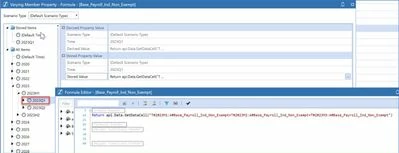

RandyThompson_2-1664478039089.jpeg


Thanks,


Best answer by Cosimo

Mr Thompson! 

At first I'm like "what kind of accounting sorcery is Randy performing wanting to add M1 + M2 + M2 for Q1??" but then looked at your screenshot and figured you made a typo ðŸ¤£


I honestly wouldn't bother to set formulas on Varying Member Properties by Time... your approach requires that you setup formulas on all quarters, halfs and full year which is cumbersome.

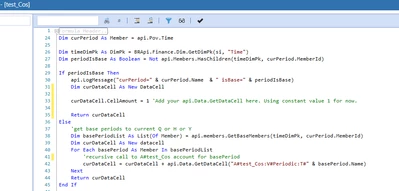
What I would actually do is revisit the formulas on the dynamic accounts such as Base_Payroll_Ind_Non_Exempt  and add a condition to run the calculation only if the Time POV is on a month.  Here's an example where I setup a dynamic account and perform a recursive call on itself to accumulate base values:


Cosimo_0-1664550314198.png


This screenshots are the results from above:


Cosimo_1-1664550391857.png


4 replies

September 30, 2022

Hi Randy

1) Drilldown formula is irrelevant for calc purposes, you can ignore that.

2) Varying a formula by time just means "from this period onwards, use this formula". So the formula you entered would be called to calculate M1, which in turn would ask for the value of M1... hence getting cyclical.

My experience on formulas is limited, but I would probably have to look at the actual formula to make a guess on why this is happening, but it might also be things like adjustments... A more experienced consultant might have a better idea.

September 30, 2022

Here is the formula:


RandyThompson_0-1664546107366.jpeg

I tried changing the account type for each accounts called in the formula from balance recurring to nonfinancial to expense to flow. None of these changes impacted the calculated quarterly value.


September 30, 2022

What you could do is detect whether you are dealing with a base Time period or not, and calculate things differently in the various cases. What follows is an example of the approach:

If api.Pov.Time.Name.XFContainsIgnoreCase("M") Then
        Return api.data.getDataCell(".... your normal formula ...")
Else 
	Return api.Data.GetDataCell("T#2021M1 + T#2021M2 + T#2021M3")
End If

 Obviously you'll want to make the "else" part more dynamic (checking if quarters, half-years, or years, and determine which periods to use - have a look at the calls in api.Time ...) but hopefully you get what the work is.

As a side note, if you need to do this sort of aggregation, it might be an indication that the value really should be stored rather than dynamic. Dynamics don't aggregate naturally (as you've just discovered), they are mostly meant for quick ratios and stuff like that.

October 1, 2022

Thanks Jack, here is what I used. Cosimo's solution works as well except my client has a weekly calendar set up for future use, so the GetBaseMembers  was returning empty weeks and not the monthly calculated value.


RandyThompson_0-1664636017560.png


CosimoAnswer
September 30, 2022

Mr Thompson! 

At first I'm like "what kind of accounting sorcery is Randy performing wanting to add M1 + M2 + M2 for Q1??" but then looked at your screenshot and figured you made a typo ðŸ¤£


I honestly wouldn't bother to set formulas on Varying Member Properties by Time... your approach requires that you setup formulas on all quarters, halfs and full year which is cumbersome.

What I would actually do is revisit the formulas on the dynamic accounts such as Base_Payroll_Ind_Non_Exempt  and add a condition to run the calculation only if the Time POV is on a month.  Here's an example where I setup a dynamic account and perform a recursive call on itself to accumulate base values:


Cosimo_0-1664550314198.png


This screenshots are the results from above:


Cosimo_1-1664550391857.png


October 1, 2022

Thanks Cosimo, still bailing me out for the last 25 years.

October 3, 2022

Of course! You're OG.

Just one small note to consider in your formula calc. I think you may need to include :V#Periodic  within your formula to ensure you're not calculating using V#YTD or any other view member POV selection.  You want to ensure that you're getting consistent results to your calculated account regardless of the View POV selection.

October 3, 2022

Will do. Thanks again for your sage advice.