
Solved
DynCalc displaying zeros
Hi all,
I have a dynamic calc that displays zeros instead of null when the source cell is null.
In the image below, MTD_CF is dynamic and it shall display None data under certain conditions. When None is null, MTD_CF is showing 0. Is there a way to avoid this so the dynamic calc shows nulls as well?
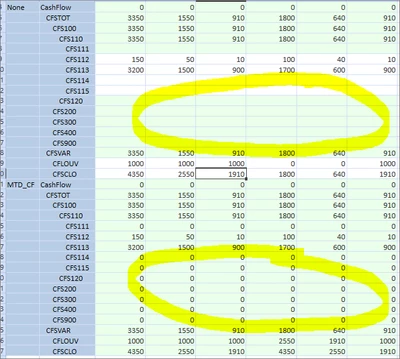
I've tried with RemoveZeros, like this:
Return api.Data.GetDataCell("RemoveZeros(V#" & view & ":U1#None)").CellAmount
The code returns the result, but does not remove the zeros.
Any ideas?
Thanks in advance.
GSF