
September 18, 2023

Extract MultiPeriod Uploaded File Using ExportStageArchives

  • September 18, 2023
  • 2 replies
  • 1 view

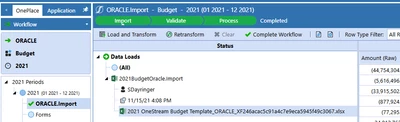
I'm able to extract the monthly csv files uploaded using BRAPi.Import.Data.ExportStageArchives, but this doesn't seem to work for multiperiod uploads (specifically budget) or I'm just referencing a parameter incorrectly. I've tried entering the time parameter as "2021", "2021M12", "2021M1", even "2021M1-2021M12" within the business rule, but nothing is exported at all for the Budget scenario.... Any ideas?

sdayringer_0-1695047531138.png


2 replies

September 21, 2023

This smells like a known bug with Scenarios with the Workflow Tracking Frequency set to Yearly, first observed on 6.4. I would get in touch with Support for details.

July 12, 2024

Hi Both,

please help me to find, where the files are stored once it's loaded in OneStream, i couldn't find the path even within onestream.

is there any configuration setting which needs to be enabled to locate the file in file share ?

Regards 

Darpan

July 12, 2024

They're not on the FileShare, they are in the application database. You should use the API for extraction.

July 12, 2024

Hi JackLacava , thanks for the quick response, i understand that the source file name and log file name i can get into an application database table - StageArchivesinformation.

yes as you mentioned, we can use the api - brapi.stagearchivesinformation, but again, it's asking for the source path, which i am unable to find 😞 

Regards 

Darpan