Hi All,
I am trying to extract data from cube view using FdxExecuteCubeView function and load the result back to cube through a connector. However, when I execute the workflow dataload, a "No valid DataKeys (Scenario / Time)" error occurred. I checked the log, it pointed out to be "Non-Numeric Amount ..................... 4" error
On the log, I am able to see the data I extracted as this :
4: Cube1, 568123, , Local, Budget, 2023, Periodic, 702151, None, BeforeAdj, None, 500100, None, None, None, None, None, None, None, 959.799999996
It seems that the data was pulled right, but just the amount cannot be recognized as numeric data
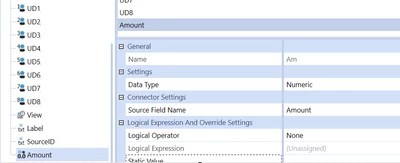
On Data Source, I did map "Amount" to the "Amount" column. I am not sure why 959.799999996 is not considered as an amount? Here is the mapping.
Here is the Rule itself.
Case Is = ConnectorActionTypes.GetFieldList
'Return Field Name List
Dim timeMemfilter As String = "T#2023"
Dim isTimePivot As Boolean = False
Dim useGenericTimeColNames As Boolean = False
Return BRApi.Import.Data.FdxGetCubeViewOrDataUnitColumnList(si, timeMemFilter, isTimePivot, useGenericTimeColNames)
Case Is = ConnectorActionTypes.GetData
'Parameter Format for WorkflowProfile Text4
'CubeViewName=[YourCubeViewName],EntityDimName=[YourEntityDimensionName],EntityMF=[E#YourEntityMemberFilter],ScenarioDimName=[YourScenarioDimName],ScenarioMF=[S#YourScenarioName],TimeMF=[T#2021],Params=[N1=V1,N2=V2],Filter=[Unknown]
'Get Parameters Stored in Text4
Dim nvb As New NameValueFormatBuilder(api.WorkflowProfile.GetAttributeValue(api.ScenarioTypeID, SharedConstants.WorkflowProfileAttributeIndexes.Text4))
Dim cubeViewName As String = nvb.NameValuePairs.XFGetValue("CubeViewName", String.Empty)
Dim entityDimName As String = nvb.NameValuePairs.XFGetValue("EntityDimName", String.Empty)
Dim entityMemFilter As String = nvb.NameValuePairs.XFGetValue("EntityMF", String.Empty)
Dim scenarioDimName As String = nvb.NameValuePairs.XFGetValue("ScenarioDimName", String.Empty)
Dim scenarioMemFilter As String = nvb.NameValuePairs.XFGetValue("ScenarioMF", String.Empty)
Dim timeMemFilter As String = nvb.NameValuePairs.XFGetValue("TimeMF", String.Empty)
Dim params As String = nvb.NameValuePairs.XFGetValue("Params", String.Empty)
Dim nvbParams As New NameValueFormatBuilder(params)
Dim includeCellTextCols As Boolean = False
Dim useStandardFactTableFields As Boolean = True
Dim useGenericTimeColNames As Boolean = True
Dim filter As String = nvb.NameValuePairs.XFGetValue("Filter", String.Empty)
Dim parallelQueryCount As Integer = 8
Dim logStatistics As Boolean = False
'Process Data
Dim dt As DataTable = BRApi.Import.Data.FdxExecuteCubeView(si, cubeViewName, entityDimName, entityMemFilter, scenarioDimName, scenarioMemFilter, timeMemFilter, nvbParams, includeCellTextCols, useStandardFactTableFields, filter, parallelQueryCount, logStatistics)
If Not dt Is Nothing Then
api.Parser.ProcessDataTable(si, dt, True, api.ProcessInfo)
Else
BRApi.ErrorLog.LogMessage(si, "FDX CV Params", nvb.GetFormatString())
End If
Return Nothing
Finally, Here is the Workflow Text 4.
CubeViewName=[TestFDX],EntityDimName=[Entity_Test],EntityMF=[E#568123],ScenarioDimName=[Scenario_Main],ScenarioMF=[S#Budget],TimeMF=[T#2023],Params=[],Filter=[Unknown]
I don't think the rule or the call of the FDX is the issue as I am able to see data in my log. However, I am not sure how to resolve the non-numeric amount issue. Is it because the data saved on data table are all considered as Strings, even for amount?
Thank you!
