
July 25, 2025
Question

FdxExecuteCubeView cannot export dynamic calculations in V#Annotation

  • July 25, 2025
  • 1 reply
  • 2 views

Hi All,

I'm working with FdxExecuteCubeView and cannot export the dynamic calculations in V#Annotation even though I have includeCellTextCols as True.

The OS documentation also says that it's possible to extract Dynamic Calc results.

In my CubeView I have a dynamic UD8 which returns the value kilogram in this case:



Here's the code I have right now:

Dim nameValuePairs 	As New NameValueFormatBuilder(String.Empty,customParams,False)
							
Dim filter As New System.Text.StringBuilder

Dim parallelQueryCount  		As Integer = 8
Dim logStatistics       		As Boolean = False
Dim includeCellTextCols 		As Boolean = True 
Dim useStandarFactTableFields 	As Boolean = False
							
Dim dt As New DataTable
							
dt = BRApi.Import.Data.FdxExecuteCubeView(si, cubeViewFilter, "","","","","", nameValuePairs, includeCellTextCols, useStandarFactTableFields, filter.ToString, parallelQueryCount, logStatistics)

Return dt

And the resulting data table shows 0.0 instead of kilogram:
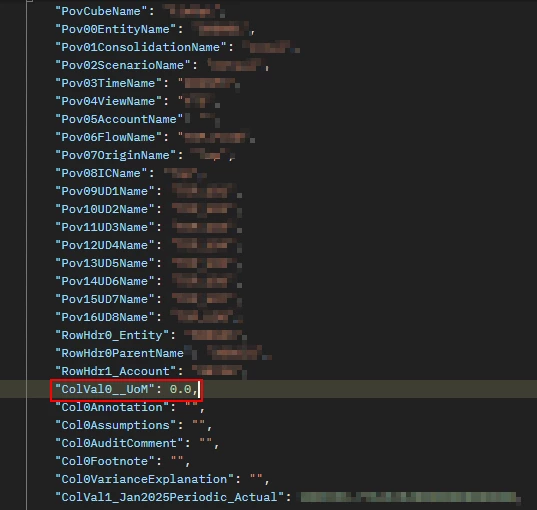


Am I missing something here?


Thanks for the help!


1 reply

July 28, 2025

Hi MartinBoglione​ 

Have you tried overriding any of the data unit dims in your BRApi call e.g. you should not need to set V#Annotation to be able to include Commentary via the includeCellTextCols boolean (this can be set to V#YTD or V#Periodic, for example). 

Currently you are inheriting everything from your cubeview (so it is difficult to see what is actually going on here / getting passed to the method from your cubeview).

If you are just starting out, I recommend starting with a simple cubeview and then building up your logic

Hope this helps

Sam

July 28, 2025

Hi Sam,

Thank you for the response. Not sure I follow what you mean though, do you mean that I should change something in the BR or in the CubeView?

This is all the code I have:

Dim cubeViewFilter    = args.NameValuePairs.XFGetValue("cubeViewFilter")
Dim timeFilter    	  = args.NameValuePairs.XFGetValue("timeFilter")
Dim entityFilter  	  = args.NameValuePairs.XFGetValue("entityFilter")
Dim accountFilter 	  = args.NameValuePairs.XFGetValue("accountFilter")
Dim viewFilter 	      = args.NameValuePairs.XFGetValue("viewFilter")
Dim ud1Filter 		  = args.NameValuePairs.XFGetValue("ud1Filter")

Dim customParams    As New Dictionary(Of String, String)
							
customParams.Add("Select_Time",timeFilter)
customParams.Add("prm_Entity",entityFilter) 
'customParams.Add("",accountFilter) 
customParams.Add("prm_View",viewFilter)
customParams.Add("prm_UD1",ud1Filter)

Dim nameValuePairs 	As New NameValueFormatBuilder(String.Empty,customParams,False)
							
Dim filter As New System.Text.StringBuilder

Dim parallelQueryCount  		As Integer = 8
Dim logStatistics               As Boolean = False
Dim includeCellTextCols 		As Boolean = True 
Dim useStandarFactTableFields 	As Boolean = False
							
Dim dt As New DataTable
							
dt = BRApi.Import.Data.FdxExecuteCubeView(si, cubeViewFilter, "","","","","", nameValuePairs, includeCellTextCols, useStandarFactTableFields, filter.ToString, parallelQueryCount, logStatistics)

Return dt

And this how I get me dynamic value with an UD8


Thanks again for the help!

July 29, 2025

The Include Text column parameter helps you get the cell-level annotation only, which means the Data Attachments that are there for the cell. I haven't seen it retrieve data from V#Annotation. I know this is not what you wanted to hear. However, you can obtain that information by querying the DataAttachment table for AttachmentType 200, which will provide the text. After running the FDX loop through the datarows, filter the earlier datatable to see if it contains a Text value, and then update your specific column with that value. It seems like a bug because it is the same table that's used to get the includeTextColumn option when enabled.