
May 11, 2023
Solved

Forecast Seeding not working for AdjInput

  • May 11, 2023
  • 2 replies
  • 0 views

Hi,

I'm trying to copy data from Actuals into Forecast,  but it seems to only work for Input and Forms Origin members, and not for Adj. Here is my formula, which I put on the Forecast Scenario:

'Copy data from Source Scenario for months 1-5
Dim currMonthNum As Integer = api.Time.GetPeriodNumFromId(api.Pov.Time.MemberId)
Dim sScenario As String
Dim ScenarioSource As String = api.Scenario.Text(api.Pov.Scenario.MemberId, 1)

If ScenarioSource = "" Then
	sScenario = api.Pov.Scenario.Name
Else
	sScenario = ScenarioSource
End If

If currMonthNum = 1 Or currMonthNum = 2 Or currMonthNum = 3 Or currMonthNum = 4 Or currMonthNum = 5 Then
	If api.Cons.IsLocalCurrencyforEntity() And Not api.Entity.HasChildren() Then
		api.Data.Calculate("S#Forecast2:A#All = S#" & sScenario & ":A#All")
		api.Data.Calculate("S#Forecast2:A#All:O#AdjInput = S#" & sScenario & ":A#All:O#AdjInput")
	End If
End If
Not sure what I'm doing wrong.  Any ideas?
 
Thanks!
Best answer by OS_Pizza

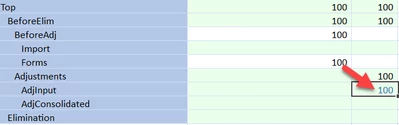
You can write to AdjInput using api.data.calculate. Below is the simple formula which i ran using custom calculate DM job.


api.Data.Calculate("O#AdjInput:'all other filter'=O#Forms:'all other filter'")


You can see the blue coloured cell which indicates calculated cell for AdjInput  member.

OS_Pizza_0-1683827004957.png


2 replies

May 11, 2023

Replying to myself,  as I think I have the answer.  It seems you can't write to the AdjInput member using Calculate.  Can anyone confirm that?

I just changed my formula to:

api.Data.Calculate("S#Forecast2:A#All:O#Import = S#" & sScenario & ":A#All:O#BeforeElim")

Which seems to work, although we'll lose a little granularity as to what was a journal vs input data in the source scenario. We can probably live with that though.


OS_PizzaAnswer
May 11, 2023

You can write to AdjInput using api.data.calculate. Below is the simple formula which i ran using custom calculate DM job.


api.Data.Calculate("O#AdjInput:'all other filter'=O#Forms:'all other filter'")


You can see the blue coloured cell which indicates calculated cell for AdjInput  member.

OS_Pizza_0-1683827004957.png


May 12, 2023

You shouldn't have to specify AdjInput separately. Typically, for the items not specifically spelled out in the calculations, it will do the calc at all levels, meaning it should copy from Import, Forms, AdjInput, etc on its own.

May 12, 2023

Thanks..  that's what I expected at first.  

In the end, I worked out that someone had left a 'api.Data.ClearCalculatedData'  which was a bit too general,  and that was clearing my AdjInput data in the target scenario.   It wasn't Calculated Data in the source scenario, so was not getting cleared there.  Hence the mismatch.