
January 29, 2023
Solved

get data value from BRApi.Finance.Data.GetDataCellUsingMemberScript

  • January 29, 2023
  • 1 reply
  • 0 views

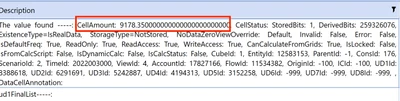
Hi, I'm trying to get the amount of an objDataCellInfoUsingMemberScript but I couldn't get the data, I'm trying this:

objDataCellInfoUsingMemberScript = BRApi.Finance.Data.GetDataCellUsingMemberScript(si,"KemetFinRptg", "E#LEGAL_Y:C#Local:S#Actual_YAGEO_Fx:T#2022M1:V#MTD:A#702006:F#Top:O#Top:I #Top:UD1#0021:U2#Top:U3#Top:U4#Top:U5#Top:U6#None:U7#None:U8#None" )
'String to convert
Dim stringToConvert As String = objDataCellInfoUsingMemberScript.DataCellEx '<-- Update string to be converted


'Convert to double. Set to 0 if string if not able to be converted
Dim dblValue As Double = stringToConvert.XFConvertToDouble(0)


grillin7_0-1675028422022.png


Best answer by JackLacava

Not sure what you're trying to do with that string roundtrip. This should work:

Dim myCell As DataCellInfoUsingMemberScript = BRApi.Finance.Data.GetDataCellUsingMemberScript(si, _
    "myCube", _
    "S#MyScenario:E#MyEntity: ... etc etc") 
Dim myValue as Decimal = myCell.DataCellEx.DataCell.CellAmount
						

Generally speaking, it's safer to work with Decimal values than Doubles, as they are less prone to "surprises" when rounding. If you have to drop it into a formula, there are a number of approaches, this is the one I like:

api.Data.FormulaVariables.SetDecimalVariable("myFixedAmount", myValue)
api.Data.Calculate("A#Target = A#Source * $myFixedAmount")


1 reply

January 30, 2023

Not sure what you're trying to do with that string roundtrip. This should work:

Dim myCell As DataCellInfoUsingMemberScript = BRApi.Finance.Data.GetDataCellUsingMemberScript(si, _
    "myCube", _
    "S#MyScenario:E#MyEntity: ... etc etc") 
Dim myValue as Decimal = myCell.DataCellEx.DataCell.CellAmount
						

Generally speaking, it's safer to work with Decimal values than Doubles, as they are less prone to "surprises" when rounding. If you have to drop it into a formula, there are a number of approaches, this is the one I like:

api.Data.FormulaVariables.SetDecimalVariable("myFixedAmount", myValue)
api.Data.Calculate("A#Target = A#Source * $myFixedAmount")


January 30, 2023

The Member Script Builder is also handy in these cases. Here is an example from the Design & Reference Guide:

Dim MemberscriptBldr = New MemberscriptBuilder("V#YTD:A#Cash")
MemberscriptBldr.SetFlow("None").SetOrigin("Import").SetIC("None").SetAllUDsToNone()
Dim Memberscript As String = MemberscriptBldr.GetMemberscript()
Dim objDataCell As DataCell = api.Data.GetDataCell(Memberscript)