
September 6, 2023
Solved

Get stored value of Entity Relationship property

  • September 6, 2023
  • 1 reply
  • 0 views

I am trying to get a stored value in Text1 from an Entity relationship:
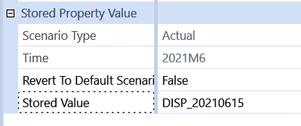
MarcusH_1-1693986753554.png

This is the code that at least does not give me an error when it executes but it does not return the Text1 value.

Dim myScenarioID As Integer = brapi.Finance.Members.GetMemberId(si, DimType.Scenario.Id, "Actual")
Dim myScenarioType As ScenarioType = BRApi.Finance.Scenario.GetScenarioType(si, myScenarioID)
Dim myTimeID As Integer = BRApi.Finance.Time.GetIdFromName(si, "2021M6")
Dim myEntityID As Integer = BRApi.Finance.Members.GetMemberId(si, DimType.Entity.Id, POVEntity)
Dim myParentID As Integer = BRApi.Finance.Members.GetMemberId(si, DimType.Entity.Id, POVParent)

' Get relationship
Dim relationship As Relationship = BRApi.Finance.members.ReadRelationshipNoCache(si, DimType.Entity.Id, myEntityID, myParentID)
' Get the properties
Dim memProperties As New VaryingMemberProperties( DimType.Entity.Id, myEntityID, myParentID )
' Get the stored value
Dim Text1Value As String = memProperties.GetEntityRelationshipProperties().Text1.GetStoredValue(myScenarioType.id, myTimeID)

Any help much appreciated.

Best answer by NicolasArgente

Hey Marcus, 
There is a native easier function to do that :

Dim sValue As String = BRApi.Finance.Entity.RelationshipText(si, _
    entityId, parentId, textPropertyIndex, varyByScenarioTypeId, varyByTimeId)

sValue = BRApi.Finance.Entity.RelationshipText(si, 0, -2, 900100, 0, 2021009000)

NicolasArgente_0-1693996502033.png

But to be honest, I tried it on my side without success. No idea why. It seems pretty straighforward but no success!

1 reply

September 6, 2023

Hey Marcus, 
There is a native easier function to do that :

Dim sValue As String = BRApi.Finance.Entity.RelationshipText(si, _
    entityId, parentId, textPropertyIndex, varyByScenarioTypeId, varyByTimeId)

sValue = BRApi.Finance.Entity.RelationshipText(si, 0, -2, 900100, 0, 2021009000)

NicolasArgente_0-1693996502033.png

But to be honest, I tried it on my side without success. No idea why. It seems pretty straighforward but no success!

MarcusHAuthor
September 6, 2023

It works for me - I think the problem with your code is the 4th parameter - textPropertyIndex - I think that should not be 0.

Thank you. I really appreciate that you have taken the time to sort out the problem.

September 6, 2023

Oh! You are correct - I did not spot that! Thanks MarcusH  for the feedback. Appreciated.