
March 5, 2024
Solved

GolfStream Formulas

  • March 5, 2024
  • 2 replies
  • 0 views

Hi,

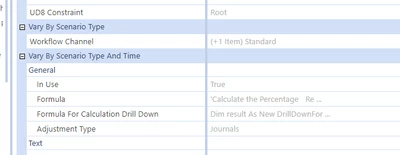
Has anyone had success with viewing the GolfStream reporting formulas such as Return on Assets or Asset Turnover?  I'm trying to learn how to write some ratios and it would be so helpful to view these.  Unfortunately, the formula is greyed out.  Please see below.  

julia2_0-1709601325180.png


Best answer by Henning

Hi, can you expand the screenshot? Is the member name on the left where you selected it also grey? It may be that you selected the member in the wrong dimension level (as per extensibility). 

2 replies

HenningAnswer
March 5, 2024

Hi, can you expand the screenshot? Is the member name on the left where you selected it also grey? It may be that you selected the member in the wrong dimension level (as per extensibility). 

March 5, 2024

julia2 this is the right answer, to modify properties you need to look at the member in the dimension in which it is actually defined - which in this case, will be one of the ancestor dimensions.

March 5, 2024

Hi julia2,

I would separately recommend reviewing the snippets available when working with member formulas and business rules. These snippets will provide great starting points for you. The common accounts section will have some of these formulas you're looking for, that with minor adjustments would be ready to use very quickly. Hope this helps.


jacobw_0-1709648772789.png


julia2Author
March 5, 2024

Thank you.  This is a huge help