Also, consider organizing your decision logic using named variables and using named strings for easier readibility. This will save you confusing which quarter you're referencing and make your code easier to read and maintain:
' Constant suffix for all POVs except the view and time
Const povBase As String = ":E#100:C#Local:S#Actual:A#1014:F#Top:O#Top:I#Top:U1#Top:U2#Top:U3#Top:U4#Top:U5#Top:U6#None:U7#Top:U8#None"

' Time periods
Dim currQtr As String = "2024Q1"
Dim prevQtr As String = "2023Q4"

' Compose POVs with data type (Periodic/Annotation) as prefix
Dim povCurrent As String = $"V#Periodic:T#{currQtr}{povBase}"
Dim povPrior As String = $"V#Periodic:T#{prevQtr}{povBase}"
Dim povAnnotation As String = $"V#Annotation:T#{currQtr}{povBase}"

' Get current and prior values
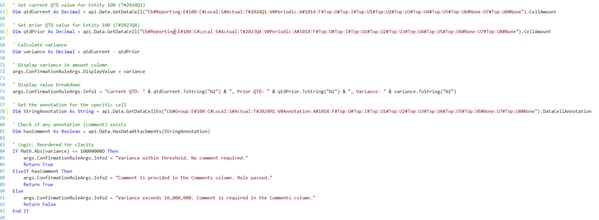
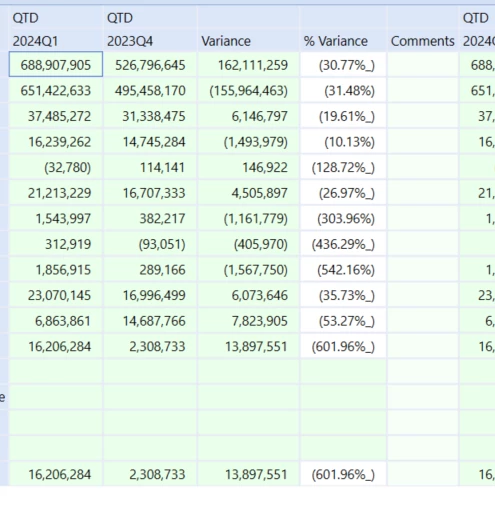
Dim qtdCurrent As Decimal = api.Data.GetDataCell(povCurrent).CellAmount
Dim qtdPrior As Decimal = api.Data.GetDataCell(povPrior).CellAmount
Dim variance As Decimal = qtdCurrent - qtdPrior

' Show calculated variance
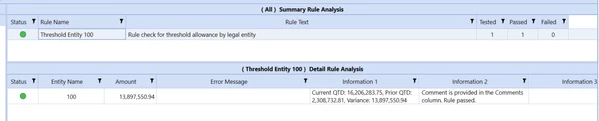
args.ConfirmationRuleArgs.DisplayValue = variance
args.ConfirmationRuleArgs.Info1 =
    $"Current QTD: {qtdCurrent:N2}, Prior QTD: {qtdPrior:N2}, Variance: {variance:N2}"

' Check for annotation
Dim annotation As String = api.Data.GetDataCellEx(povAnnotation).DataCellAnnotation
Dim hasComment As Boolean = Not String.IsNullOrWhiteSpace(annotation)
Dim varianceExceedsThreshold As Boolean = Math.Abs(variance) > 15000000D

' Rule enforcement
If Not varianceExceedsThreshold Then
    args.ConfirmationRuleArgs.Info2 = "Variance within threshold. No comment required."
    Return True
ElseIf hasComment Then
    args.ConfirmationRuleArgs.Info2 = "Variance exceeds 15,000,000 and comment is provided. Rule passed."
    Return True
Else
    args.ConfirmationRuleArgs.Info2 = "Variance exceeds 15,000,000. Comment is required in the Comments column."
    Return False
End If