
May 6, 2025

Help with Table Views

  • May 6, 2025
  • 2 replies
  • 0 views

Hello,

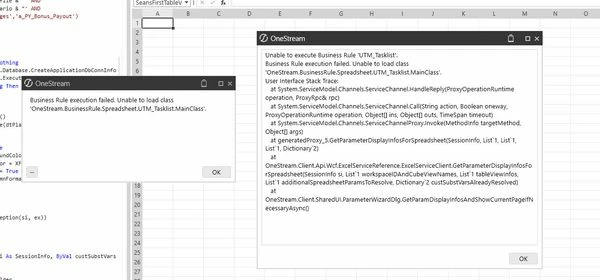
I'm attempting to create my first table view using the syntax below.  The SQL is a very basic record grab from DataEntryAuditSource (initial POC).  Compiles fine and seems to be okay relative to the user guide, but I keep getting an error message when I attempt to run.  Does anyone have any thoughts on what I could be doing wrong?

Thanks, Sean

-----


Imports System
Imports System.Collections.Generic
Imports System.Data
Imports System.Data.Common
Imports System.Globalization
Imports System.IO
Imports System.Linq
Imports Microsoft.VisualBasic
Imports OneStream.Finance.Database
Imports OneStream.Finance.Engine
Imports OneStream.Shared.Common
Imports OneStream.Shared.Database
Imports OneStream.Shared.Engine
Imports OneStream.Shared.Wcf
Imports OneStream.Stage.Database
Imports OneStream.Stage.Engine


Namespace OneStream.BusinessRule.Spreadsheet.UTM_TaskList
    Public Class MainClass
        Public Function Main(ByVal si As SessionInfo, ByVal globals As BRGlobals, ByVal api As Object, ByVal args As SpreadsheetArgs) As Object
            Try
                Select Case args.FunctionType
                    
'                    Case Is = SpreadsheetFunctionType.Unknown
                        
'                    Case Is = SpreadsheetFunctionType.GetCustomSubstVarsInUse
                        
                    Case Is = SpreadsheetFunctionType.GetTableView
                        If args.TableViewName.Equals("SeansFirstTableView")
                            Return GetUTMTaskListExport(si)
                        End If
                        
'                    Case Is = SpreadsheetFunctionType.SaveTableView
                        
                End Select

                Return Nothing
            Catch ex As Exception
                Throw ErrorHandler.LogWrite(si, New XFException(si, ex))    
            End Try
        End Function
    

#Region "Get Table Views"
        Private Function GetUTMTaskListExport(ByVal si As SessionInfo) As TableView
            Try
                
                Dim SQL_TaskListExport_L As New Text.StringBuilder
                SQL_TaskListExport_L.AppendLine("
            SELECT
                    DataEntryAuditSource.UserID as ID,
                    DataEntryAuditSource.TimeStamp as TimeStamp,
                    DataEntryAuditSource.UniqueID as RecordID,
                    DataEntryAuditSource.CubeVieworFileName as Format,
                    DataEntryAuditSource.DataEntryType as Type,
                    FROM DataEntryAuditSource
                ")    
                
                'Create and fill the DataTable
                Dim DT_TaskListExport_L As DataTable = Nothing
                Using dbConnApp As DbConnInfo = BRApi.Database.CreateApplicationDbConnInfo(si)
                    dt_TaskListExport_L = BRApi.Database.ExecuteSql(dbConnApp, sql_TaskListExport_L.ToString, False)
                    If Not dt_TaskListExport_L Is Nothing Then dt_TaskListExport_L.TableName = "NoData"
                End Using
                
                'Create and Populate Table View
                Dim tv_TaskListExport As New TableView()
                tv_TaskListExport.PopulateFromDataTable(dt_TaskListExport_L, True, True)

                'Table View Settings and Formatting
                tv_TaskListExport.CanModifyData = False
                tv_TaskListExport.HeaderFormat.BackgroundColor = XFColors.XFDarkBlueBackground
                tv_TaskListExport.HeaderFormat.TextColor = XFColors.White
                tv_TaskListExport.HeaderFormat.IsBold = True
                tv_TaskListExport.Columns.Item(1).ColumnFormat.ColumnWidth = 15
                
                Return tv_TaskListExport
                
            Catch ex As Exception
            Throw ErrorHandler.LogWrite(si, New XFException(si, ex))
            End Try
            
        End Function 'GetUTMTaskListExport
        #End Region
        
        End Class
End Namespace

2 replies

Employee
May 6, 2025

Do you get a more useful error if you look in the Error Log?

May 7, 2025

There is a syntax error in the SQL statement. Line 56. The final column statement in the SELECT clause has a comma just before the FROM key word. This works for me

Imports System
Imports System.Collections.Generic
Imports System.Data
Imports System.Data.Common
Imports System.Globalization
Imports System.IO
Imports System.Linq
Imports Microsoft.VisualBasic
Imports OneStream.Finance.Database
Imports OneStream.Finance.Engine
Imports OneStream.Shared.Common
Imports OneStream.Shared.Database
Imports OneStream.Shared.Engine
Imports OneStream.Shared.Wcf
Imports OneStream.Stage.Database
Imports OneStream.Stage.Engine


Namespace OneStream.BusinessRule.Spreadsheet.UTM_TaskList
    Public Class MainClass
        Public Function Main(ByVal si As SessionInfo, ByVal globals As BRGlobals, ByVal api As Object, ByVal args As SpreadsheetArgs) As Object
            Try
                Select Case args.FunctionType
                    
'                    Case Is = SpreadsheetFunctionType.Unknown
                        
'                    Case Is = SpreadsheetFunctionType.GetCustomSubstVarsInUse
                        
                    Case Is = SpreadsheetFunctionType.GetTableView
                        If args.TableViewName.Equals("SeansFirstTableView")
                            Return GetUTMTaskListExport(si)
                        End If
                        
'                    Case Is = SpreadsheetFunctionType.SaveTableView
                        
                End Select

                Return Nothing
            Catch ex As Exception
                Throw ErrorHandler.LogWrite(si, New XFException(si, ex))    
            End Try
        End Function
    

#Region "Get Table Views"
        Private Function GetUTMTaskListExport(ByVal si As SessionInfo) As TableView
            Try
                
                Dim SQL_TaskListExport_L As New Text.StringBuilder
                SQL_TaskListExport_L.AppendLine("
            SELECT
                    DataEntryAuditSource.UserID as ID,
                    DataEntryAuditSource.TimeStamp as TimeStamp,
                    DataEntryAuditSource.UniqueID as RecordID,
                    DataEntryAuditSource.CubeVieworFileName as Format,
                    DataEntryAuditSource.DataEntryType as Type
                    FROM DataEntryAuditSource
                ")    
                
                'Create and fill the DataTable
                Dim DT_TaskListExport_L As DataTable = Nothing
                Using dbConnApp As DbConnInfo = BRApi.Database.CreateApplicationDbConnInfo(si)
                    dt_TaskListExport_L = BRApi.Database.ExecuteSql(dbConnApp, sql_TaskListExport_L.ToString, False)
                    If Not dt_TaskListExport_L Is Nothing Then dt_TaskListExport_L.TableName = "NoData"
                End Using
                
                'Create and Populate Table View
                Dim tv_TaskListExport As New TableView()
                tv_TaskListExport.PopulateFromDataTable(dt_TaskListExport_L, True, True)

                'Table View Settings and Formatting
                tv_TaskListExport.CanModifyData = False
                tv_TaskListExport.HeaderFormat.BackgroundColor = XFColors.XFDarkBlueBackground
                tv_TaskListExport.HeaderFormat.TextColor = XFColors.White
                tv_TaskListExport.HeaderFormat.IsBold = True
                tv_TaskListExport.Columns.Item(1).ColumnFormat.ColumnWidth = 15
                
                Return tv_TaskListExport
                
            Catch ex As Exception
            Throw ErrorHandler.LogWrite(si, New XFException(si, ex))
            End Try
            
        End Function 'GetUTMTaskListExport
        #End Region
        
        End Class
End Namespace

Please use the 'Insert Code sample' function for any code - click the {:} at the bottom of this dialogue.

May 8, 2025

Thanks.  Oddly enough, this code still won't run for me even after the syntax correction at row 56.  I was able to create a new rule and copy the exact same syntax, changing only the name and it does work?  Any thoughts on why that would be the case?