
December 13, 2024
Solved

How to Exclude Entities from Confirmation Rule

  • December 13, 2024
  • 2 replies
  • 0 views

Hello,

I'm somewhat new to writing code for confirmation rules. I'm trying to create a confirmation that is only for 1 entity and we'd like it in our general rule groups for confirmation rules and not have to create it's own rule profile. 

Basically we need to the rule to be If WFProfile Entity <> 02140 return True, if not then (enter rule I already created).

I couldn't find anything in the documentation about making it entity specific and excluding other entities.

Thanks,

Will
Best answer by Ioana

Hi Will,

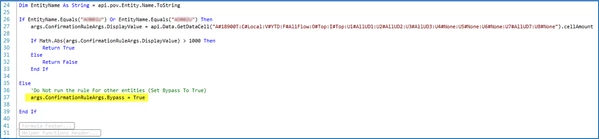
Can you try using the below example and adapt it for your needs? You should be able to run the confirmation rule only for 02140 and all others should return True:


Thanks,

Ioana

2 replies

IoanaAnswer
December 16, 2024

Hi Will,

Can you try using the below example and adapt it for your needs? You should be able to run the confirmation rule only for 02140 and all others should return True:


Thanks,

Ioana

December 16, 2024

Hi Ioana,

Thank you for the reply. I also was able to do something similar for what you did below.

' To check if Entity equals 02140
If api.Pov.Entity.Name <> "02140" Then
    Return True
ElseIf args.ConfirmationRuleArgs.DisplayValue = api.Data.GetDataCell("Cb#Consol:C#Local:S#Actual:V#Periodic:A#8211:F#EndBalInput:O#BeforeAdj:I#None:U1#81:U2#DEF:U3#L_UNA:U4#None:U5#None:U6#None:U7#USGAAP_JE:U8#None").cellAmount And
	args.ConfirmationRuleArgs.DisplayValue = api.Data.GetDataCell("Cb#Consol:C#Local:S#Actual:V#Periodic:A#9901:F#EndBalInput:O#BeforeAdj:I#None:U1#99:U2#DEF:U3#L_UNA:U4#None:U5#None:U6#None:U7#USGAAP_JE:U8#None").cellAmount And
	args.ConfirmationRuleArgs.DisplayValue = api.Data.GetDataCell("Cb#Consol:C#Local:S#Actual:V#Periodic:A#TaxPmt|WFYear|:F#EndBalInput:O#BeforeAdj:I#None:U1#00:U2#DEF:U3#L_UNA:U4#None:U5#None:U6#None:U7#USGAAP_JE:U8#None").cellAmount Then
    If args.ConfirmationRuleArgs.DisplayValue <> 0 Then
        Return True
    Else
        Return False
    End If
End If

My question to you now is, the 3rd args.ConfirmationRuleArgs.DisplayValue with account TaxPmt|WFYear|. OS doesn't like parameter in it. Currently I have the cube view set up to be dynamic, so when an user goes to that cube view in their WF, the account would automatically update to the correct year. So if they went back to 2022, it would change to TaxPmt2022 and when they move to WF year 2025, it will change to TaxPmt2025.

Is there a similar way to do this for Confirmation Rules?

Thanks,

Will

December 16, 2024

Can you include in the confirmation rule the following?

Dim WFYear As Integer = api.Time.GetYearFromId(api.Pov.Time.MemberId)

And then replace A#TaxPmt|WFYear| with A#""TaxPmt"& WFYear &". Check if this works.

Thanks,

Ioana

December 17, 2024

Thanks Ioana! That worked great. One last question. I'm trying it to pass 3 accounts where all 3 need to have values in it. Right now it keeps failing, even though I have values in those accounts. Not sure if it's the "And" that isn't working correctly, but individually the accounts work. I know I can write it out individually, but I wanted to keep it in one rule.

Dim EntityName As String = api.Pov.Entity.Name.ToString
Dim WFYear As Integer = api.Time.GetYearFromId(api.Pov.Time.MemberId)

If EntityName.Equals("02140") Then
	args.ConfirmationRuleArgs.DisplayValue = api.Data.GetDataCell("Cb#Consol:C#Local:S#Actual:V#Periodic:A#8211:F#EndBalInput:O#BeforeAdj:I#None:U1#81:U2#DEF:U3#L_UNA:U4#None:U5#None:U6#None:U7#USGAAP_JE:U8#None").cellAmount And
	args.ConfirmationRuleArgs.DisplayValue = api.Data.GetDataCell("Cb#Consol:C#Local:S#Actual:V#Periodic:A#9901:F#EndBalInput:O#BeforeAdj:I#None:U1#99:U2#DEF:U3#L_UNA:U4#None:U5#None:U6#None:U7#USGAAP_JE:U8#None").cellAmount And
	args.ConfirmationRuleArgs.DisplayValue = api.Data.GetDataCell("Cb#Consol:C#Local:S#Actual:V#Periodic:A#TaxPmt" & WFYear & ":F#EndBalInput:O#BeforeAdj:I#None:U1#00:U2#DEF:U3#L_UNA:U4#None:U5#None:U6#None:U7#USGAAP_JE:U8#None").cellAmount
    
	If args.ConfirmationRuleArgs.DisplayValue <> 0 Then
        Return True
    Else
        Return False
    End If

Else
	'Do Not run the rule for other entities (Set Bypass to True)
	args.ConfirmationRuleArgs.Bypass = True
	
End If

Thanks,

Will