September 27, 2025
Solved

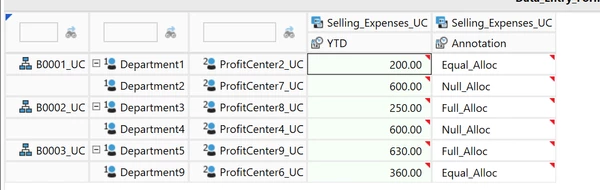
How to looping Through Cube View Rows to Read Amount and Text Value Using Business Rule?
  • September 27, 2025
  • 3 replies
  • 5 views


Best answer by sameburn

Hi AtharvaKabade​ 

If you want to replicate that CubeView data set in its entirety, you may want to consider using the FDX CubeView BRApi

There is an example here

This method uses your CubeView to derive the data set and returns the output as a DataTable.

You can then interact with this DataTable to retrieve the values you want e.g. loop through DataRows or use .Select, etc

So less overhead for development since you can read your variables directly from the CubeView itself (including Commentary and / or Dynamic Calcs)

Hope this helps

Sam

3 replies

September 29, 2025

Hey Atharva. I think some of the key OneStream API functions/subs you could try using include:

  1. Api.Data.GetDataCell().CellAmount - can be used to get a cell's amount/decimal value 
  2. Api.Data.GetDataCellEx().DataCellAnnotation - can be used to get a cell's annotation/text value 

For the loop itself I would recommend trying to use data buffers to grab slices of the data units that are represented in your cube view. You can use a "for each...next" loop to loop through the cells in each required data buffer and utilize (1) and (2) for each cell in the loop to drive additional logic within the finance business rule. 

September 30, 2025

Hey Dsebenaler,

Thank you. 

sameburnAnswer
September 30, 2025

Hi AtharvaKabade​ 

If you want to replicate that CubeView data set in its entirety, you may want to consider using the FDX CubeView BRApi

There is an example here

This method uses your CubeView to derive the data set and returns the output as a DataTable.

You can then interact with this DataTable to retrieve the values you want e.g. loop through DataRows or use .Select, etc

So less overhead for development since you can read your variables directly from the CubeView itself (including Commentary and / or Dynamic Calcs)

Hope this helps

Sam
