
April 22, 2024
Solved

How to use the Text1 field from a user's security profile as a parameter in a dashboard

  • April 22, 2024
  • 3 replies
  • 1 view

I have a dashboard that pulls Workflow status information.  It is currently hard coded to look at a top level Workflow parent, as it is for Group use only.

I want to make this dashboard available for the regions too, and change the hard coded workflow selection in the dashboard to instead run from the Text 1 property in the user's security setup.

How can I do that? 

I managed to pull Text 1 using a SQL query, but this only seems to work for me when I set the Parameter as a Bound List. The problem with that is that the Bound list pops up as a selection when the dashboard is run, which I don't want to happen. It should be seamless. 
Best answer by JackLacava

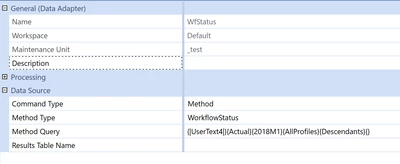
You said you want to avoid a BR, so what about this Substitution Variable |UserText1| ? This example uses Text4:


JackLacava_0-1713803334624.png


3 replies

April 22, 2024

Hi Beeswing77 ,  Parameters are frustrating to me in this regard.  

In your situation, I would use an XFBR rule to query and return the text1 value.  This takes parameters out of the whole equation and puts the code in your hands.

April 22, 2024

I was hoping to avoid a BR, as I'm not quite sure where to start with one.  If that's the only option though I might have to look into that.

April 22, 2024

I'm a bit confused. Is this what you have in mind?

  1. when the dashboard loads, it looks up the Text1 property of the user
  2. Text1 contains a single value (the workflow name?)
  3. You must take this value and feed it to some adapter
April 22, 2024

Yes, correct.

April 22, 2024

You said you want to avoid a BR, so what about this Substitution Variable |UserText1| ? This example uses Text4:


JackLacava_0-1713803334624.png


April 22, 2024

Beeswing77  - You can also try current WF selection. based on the Current WF Profile it will displays the status. It is more dynamic, in this method the user should select the WF Profile before executing the dashboard.

April 22, 2024

Hi,

Yes, that was our starting point. 

In this instance though that doesn't work for us.  The dashboard shows the workflow status for all workflows in the Group. We have a button set up so that if you select one line of the dashboard and then press the button it jumps you straight to the relevant entity's workflow.  If the dashboard is dynamic, like you suggest, when we jump back to the dashboard it will only show the entity that we drilled in on, instead of the Group.