
November 9, 2025
Solved

Invalid destination data unit in script

  • November 9, 2025
  • 3 replies
  • 2 views

I'm making my first attempt at using the DataBuffer to perform a data copy from a source scenario to a destination scenario. This is being done through a Data Management (DM) step and a Custom Calculate business rule. To keep things simple for this initial version, the input values are hard-coded.

Dim dbSource As DataBuffer = api.Data.GetDataBufferUsingFormula("S#Budget:T#2026M7:A#CF101:O#AdjInput:E#ES", DataApiScriptMethodType.Calculate, False)

Dim destinationInfo As ExpressionDestinationInfo = api.Data.GetExpressionDestinationInfo("S#Forecast_Q2:T#2026M7:A#CF101:E#ES:O#AdjInput")

api.Data.SetDataBuffer(dbSource, destinationInfo,,,,,,,,,,,,,False)
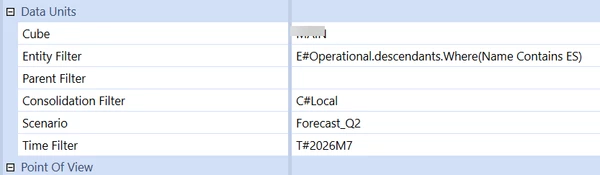


 Appreciate any inputs to fix this. Thanks 

Best answer by sameburn

In your case I suspect it is your entity filter. Which i am guessing will differ to your hard coded E#ES at runtime. Maybe try just passing in a single entity and then build up your logic from there.

You can use FinanceRulesApi object to get Entity, Scenario and Time etc dynamically from what you pass in e.g api.Pov.Entity.Name

3 replies

November 10, 2025

Hi svj12

The best way to understand this is that the ExpressionDestinationInfo object represents the data unit dimensions in your buffer (the target), only.

You can leave this blank if you are using a custom calculate and it will use the data unit passed in by your DM step (this is good practice).

It should never include non data unit dims e.g A#,O# etc

You cannot write to a data unit this way, if it is not passed in via your selections e g not the E#, S# or T# passed into your logic.

This is what your error suggests you are trying to do e.g does the target  E#, S# or T# you are trying to set correspond to the E#, S# or T# that you are passing into your logic. If not you typically get an 'invalid destination data unit' error

Hope this helps

Sam

sameburnAnswer
November 10, 2025

In your case I suspect it is your entity filter. Which i am guessing will differ to your hard coded E#ES at runtime. Maybe try just passing in a single entity and then build up your logic from there.

You can use FinanceRulesApi object to get Entity, Scenario and Time etc dynamically from what you pass in e.g api.Pov.Entity.Name

svj12Author
November 10, 2025

Hi sameburn​. It worked perfectly after I updated the entity filter based on your suggestion. Thank you so much!