May 3, 2024
Solved

<Issue Resolved>

  • May 3, 2024
  • 2 replies
  • 0 views

Unposting

Best answer by Krishna

Nikpowar97  -  Here is an example, It will clear and set the status to Not Started but could you please provide more info on "Previous WF Step is not completed"  Did you enabled the below settings in App Property 


BRApi.Workflow.Status.SetWorkflowStatus(si, si.WorkflowClusterPk, StepClassificationTypes.DataLoadClearData, WorkflowStatusTypes.NoStatus, "Auto completing Import", "Error autocompleting ", "Auto completing", Nothing)
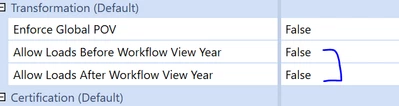

Krishna_0-1714751383071.png


2 replies

KrishnaAnswer
May 3, 2024

Nikpowar97  -  Here is an example, It will clear and set the status to Not Started but could you please provide more info on "Previous WF Step is not completed"  Did you enabled the below settings in App Property 


BRApi.Workflow.Status.SetWorkflowStatus(si, si.WorkflowClusterPk, StepClassificationTypes.DataLoadClearData, WorkflowStatusTypes.NoStatus, "Auto completing Import", "Error autocompleting ", "Auto completing", Nothing)


Krishna_0-1714751383071.png


May 6, 2024

The point of a forum is others that may have the same question and might save time by finding your answered post.  Now they cannot because the question and the title are gone.
