
Key Error on an account member formula
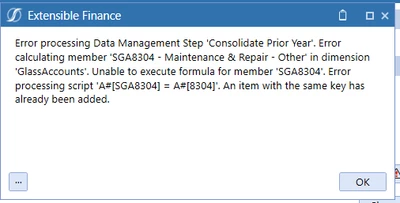
I'm trying to figure out where I can access the Key related to this error.
I created a series of new accounts and member formulas by extracting an existing set of accounts from our application.
I opened the extracted file in Notepad and performed a find/replace on account names and formula members, saved my changes and uploaded the modified file.
When I try to consolidate, I get the same error as above for every account I added this way.
is there are way to fix this, short of deleting the new accounts and adding manually within the application?