June 23, 2023
Solved

Literal parameters and multiple users

  • June 23, 2023
  • 7 replies
  • 8 views

Hi all, 

I'm currently developing a dashboard that will likely be used by multiple users at the same time. 
Users will be able to set some initial parameters within the dashboard, and click on a button that will trigger a BR that will return some output rows within a table in the database. 
After the process is complete, the user will be able to see the output rows through the following SQL Table Editor:


fc_0-1687513687144.png

the parameters that you can see in the "Where Clause" are literal parameters that are set from within the BR when it is triggered by the user (using BRApi.Dashboards.Parameters.SetLiteralParameterValue()), and their value depend on the initial parameters that the user selected in the dashboard.

The problem is, I saw in some posts within the forum that literal parameters are "common" to all users, so every time one user will click the button and launch the process, the literal parameters will be changed. This is a problem, because we expect users to use the dashboard simultaneously. 
Is there a workaround that does not use literal parameters? Or is there a way to make literal parameters "unique" to every user?


Thanks in advance!
Best answer by RobbSalzmann

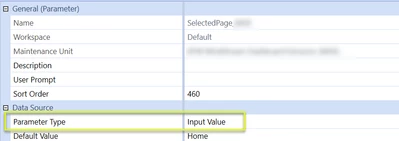
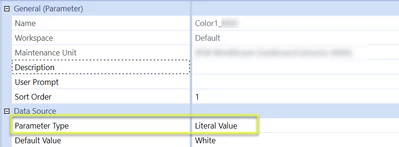
Literal Parameters values are application-wide, session inspecfic.  Things like formats and colors work well in Literal parameters 


RobbSalzmann_1-1687546284465.png


For user/session specific parameters, use Input Parameters:


RobbSalzmann_2-1687546376131.png

In your code, these Input Parameters are oddly named "ModifiedSubVars".  You change the value of the ModifiedSubVars on the returned Task Result object, e.g.  XFLoadDashboardTaskResult, XFSelectionChangedTaskResult depending on what event you're handling.  Be sure to also set one or all of the ChangeCustomSubstVarsIn properties to True.

E.g. 

selectionChangedTaskResult.ChangeCustomSubstVarsInDashboard = True
selectionChangedTaskResult.ModifiedCustomSubstVars.Add("pm_myParameter_Name", "User Specific Value")

7 replies

June 23, 2023

Hi fc,


You can set user text property and fetch that value rather than a literal value parameter. 

Dim objUserInfo As UserInfo = BRApi.Security.Admin.GetUser(si, si.UserName)
objUserInfo.User.Text4 = "Setyour value"
Brapi.ErrorLog.LogMessage(si, objUserInfo.User.Text4)

Thanks, Omkareshwar

Archetype Consulting 

June 23, 2023

You can also try using:

BRApi.State.GetUserState
BRApi.State.SetUserState


June 23, 2023

We are mainly using SetLiteralParameter to store options that should be valid for everybody, like security settings or some basic information like top member nodes, we are not using literal parameters to do anything dynamic or session dependent.

For this purpose, we have all other parameters with 'Input Value' being the most generic.

You can set these dynamic parameters using 'Dashboard Extender' business rules and depending on the use case these two objects XFLoadDashboardTaskResult (for LoadDashboard activities)

Dim loadDashboardTaskResult As New XFLoadDashboardTaskResult()

and XFSelectionChangedTaskResult (actions triggered by dashboard objects)

Dim selectionChangedTaskResult As New XFSelectionChangedTaskResult()

Both own one (load: ModifiedCustomSubstVars) or two (selection: ModifiedCustomSubstVars and ModifiedCustomSubstVarsForLaunchedDashboard) dictionaries you can use to change parameter values.

with

return loadDashboardTaskResult 

or

return selectionChangedTaskResult

you activate the changes.

if you create a new business rule, you get basic samples for these objects:

Case Is = DashboardExtenderFunctionType.LoadDashboard
	If args.FunctionName.XFEqualsIgnoreCase("TestFunction") Then
		
		'Implement Load Dashboard logic here.
		
		If args.LoadDashboardTaskInfo.Reason = LoadDashboardReasonType.Initialize And args.LoadDashboardTaskInfo.Action = LoadDashboardActionType.BeforeFirstGetParameters Then
			Dim loadDashboardTaskResult As New XFLoadDashboardTaskResult()
			loadDashboardTaskResult.ChangeCustomSubstVarsInDashboard = False
			loadDashboardTaskResult.ModifiedCustomSubstVars = Nothing
			Return loadDashboardTaskResult
			End If
	End If

Case Is = DashboardExtenderFunctionType.ComponentSelectionChanged
	If args.FunctionName.XFEqualsIgnoreCase("TestFunction") Then
		
		'Implement Dashboard Component Selection Changed logic here.
		
		Dim selectionChangedTaskResult As New XFSelectionChangedTaskResult()
		selectionChangedTaskResult.IsOK = True
		selectionChangedTaskResult.ShowMessageBox = False
		selectionChangedTaskResult.Message = ""
		selectionChangedTaskResult.ChangeSelectionChangedUIActionInDashboard = False
		selectionChangedTaskResult.ModifiedSelectionChangedUIActionInfo = Nothing
		selectionChangedTaskResult.ChangeSelectionChangedNavigationInDashboard = False
		selectionChangedTaskResult.ModifiedSelectionChangedNavigationInfo = Nothing
		selectionChangedTaskResult.ChangeCustomSubstVarsInDashboard = False
		selectionChangedTaskResult.ModifiedCustomSubstVars = Nothing
		selectionChangedTaskResult.ChangeCustomSubstVarsInLaunchedDashboard = False
		selectionChangedTaskResult.ModifiedCustomSubstVarsForLaunchedDashboard = Nothing
		Return selectionChangedTaskResult
	End If


The property names should be self explanatory.

I hope this helps and cheers

Christian

October 25, 2024

Hi,

Is there a way to read input parameters from a XFBR rule?  I am trying to set input value parameter to use it a data adapter (FormsStatusForWorkflowUnit) it doesn't like |!inputValue!| (doesn't seem to be able to read the value setup.  But it'w working great on other component (e.g. Button).

Regards,

June 23, 2023

You can also create an Ancillary table to store the parameter selection for each user. And fetch those values in your dashboard with this approach you can also save pervious selections made by the user. 

You can opt for any of the approach mentioned the Ancillary table is the preferred one, but it is complex where as |UserText4| is simpler and quickest to implement.

June 26, 2023

I wouldn't recommend storing parameters in tables. That is what session variables are for. Please do not create tables when you can use existing functionality.

September 9, 2025

Hi ckattookaran​ , do you have any example on how to use the session variables in this case? Thanks

June 23, 2023

Literal Parameters values are application-wide, session inspecfic.  Things like formats and colors work well in Literal parameters 


RobbSalzmann_1-1687546284465.png


For user/session specific parameters, use Input Parameters:


RobbSalzmann_2-1687546376131.png

In your code, these Input Parameters are oddly named "ModifiedSubVars".  You change the value of the ModifiedSubVars on the returned Task Result object, e.g.  XFLoadDashboardTaskResult, XFSelectionChangedTaskResult depending on what event you're handling.  Be sure to also set one or all of the ChangeCustomSubstVarsIn properties to True.

E.g. 

selectionChangedTaskResult.ChangeCustomSubstVarsInDashboard = True
selectionChangedTaskResult.ModifiedCustomSubstVars.Add("pm_myParameter_Name", "User Specific Value")

fc5Author
June 26, 2023

Hi Rob,

I tried to use your approach but I did not succeeded. Below a sample of the code I wrote:

Case Is = DashboardExtenderFunctionType.ComponentSelectionChanged

Dim selectionResult As XFSelectionChangedTaskResult=Nothing

If args.FunctionName.XFEqualsIgnoreCase("LaunchAdjustment") Then
..
declare variables
..

selectionResult=Me.AdjustmentProcessMain(.. list of arguments ..)

Return selectionResult


 Private Function AdjustmentProcessMain(... list of arguments ...) As XFSelectionChangedTaskResult

Try

Dim selectionChangedTaskResult As New XFSelectionChangedTaskResult()
selectionChangedTaskResult.ChangeCustomSubstVarsInDashboard = True

selectionChangedTaskResult.ModifiedCustomSubstVars.Add("p_RowEntityList","test")
selectionChangedTaskResult.ModifiedCustomSubstVars.Add("p_RowAccList","test1")
selectionChangedTaskResult.ModifiedCustomSubstVars.Add("p_RowDocList","test2")

Body of the function
...
...
...

Return selectionChangedTaskResult


 The script is triggered when the user clicks on a button, and (as shown above) I expect the three Input Value parameters (p_RowEntityList, p_RowAccList, p_RowDocList) to be assigned some values (some random strings in this case). 

Nevertheless, when the script is triggered, the underlying process runs fine, but the parameters are not populated. 
What am I doing wrong?


If you need additional details please let me know! Thank you

June 26, 2023

You can only see the values, if you embed them in an object or, in the design mode:


ChristianW_0-1687798913996.png


fc5Author
June 27, 2023

It works now! Thank you all for the help.
The problem seemed to be that I was not embedding the parameter in any of the components that are present in the dashboard like Christian suggested. 
After embedding the 3 parameters in 3 different Label components and placing the Label components anywhere within the dashboard, the process started working as supposed, and the parameters are now correctly populated. 
One last thing, though, is that now every time the dashboard is refreshed, a popup window appears showing the current value assigned to each of the 3 parameters:


fc_0-1687871461965.png

I believe that's because the parameters are Input parameters.

Is there a way to get rid of it?


June 27, 2023

Something isn't getting set in the BR.  This is tricky to troubleshoot.  If all params are set in the BR, you should not get this dialog.  Sometimes its a misspelling or param in the wrong place or forgetting something in the code.  Post your BR code if you want a second set of eyes on it.

fc5Author
June 27, 2023
Public Function Main(...arguments...) As Object
Try

Select Case args.FunctionType

Case Is = DashboardExtenderFunctionType.LoadDashboard
If args.FunctionName.XFEqualsIgnoreCase("LoadFunction") Then
.....
End If

Case Is = DashboardExtenderFunctionType.ComponentSelectionChanged
Dim selectionResult As XFSelectionChangedTaskResult=Nothing

If args.FunctionName.XFEqualsIgnoreCase("LaunchAdjustment") Then
...
selectionResult=Me.AdjustmentProcessMain(...arguments...)
Return selectionResult
End If
End Select
Return Nothing

Catch ex As Exception
Throw ErrorHandler.LogWrite(si, New XFException(si, ex))
End Try
End Function


Private Function AdjustmentProcessMain(..arguments..) As XFSelectionChangedTaskResult
Try
Dim selectionChangedTaskResult As New XFSelectionChangedTaskResult()
selectionChangedTaskResult.ChangeCustomSubstVarsInDashboard = True
...
Dim paramchange As New XFselectionchangedtaskresult()
paramchange = Me.AssignOutputParams(si)     'This is the function within which the parameters are assigned a value
.....

Dim Checkresult As String = "... string that pops up when process completed..."
Dim messageresult As New XFselectionchangedtaskresult()
messageresult = Me.ShowMessage(si,Checkresult)
selectionChangedTaskResult.IsOK = messageresult.IsOK
selectionChangedTaskResult.ShowMessageBox = messageresult.ShowMessageBox
selectionchangedtaskresult.Message = messageresult.Message
selectionChangedTaskResult.ModifiedCustomSubstVars = paramchange.ModifiedCustomSubstVars

Return selectionChangedTaskResult

Catch ex As Exception
Throw ErrorHandler.LogWrite(si, New XFException(si, ex))
End Try
End Function


Private Function AssignOutputParams(ByVal si As SessionInfo) As XFSelectionChangedTaskResult
Try
Dim selectionChangedTaskResult As New XFSelectionChangedTaskResult()
Using
... define variables to be assigned to parameters ...
selectionChangedTaskResult.ModifiedCustomSubstVars.Add("p_RowEntityList",Entity_Param_List)
selectionChangedTaskResult.ModifiedCustomSubstVars.Add("p_RowAccList",Acc_Param_List)
selectionChangedTaskResult.ModifiedCustomSubstVars.Add("p_RowDocList",Doc_Param_List)

End Using
Return selectionChangedTaskResult

Catch ex As Exception
Throw ErrorHandler.LogWrite(si,New XFException(si,ex))
End Try
End Function

Private Function ShowMessage(...arguments...) As XFSelectionChangedTaskResult
Try
Dim selectionChangedTaskResult As New XFSelectionChangedTaskResult()
selectionChangedTaskResult.Message= StringHelper.FormatMessage("...message string...")
'Show Message box that the file was processed
selectionChangedTaskResult.IsOK=True
selectionChangedTaskResult.ShowMessageBox= True
Return selectionChangedTaskResult

Catch ex As Exception
Throw ErrorHandler.LogWrite(si,New XFException(si,ex))
End Try
End Function

 I copied here the relevant parts of the BR.
The function that is triggered when the user clicks on the button is AdjustmentProcessMain, within it the function AssignOutputParams is called, and that is where the parameters are assigned a value.


Thanks again for the help, much appreciated!!

fc5Author
June 30, 2023

It finally works! The problem was that the popup came out every time the dashboard refreshed, thus every time this section of the script was triggered:

    Case Is = DashboardExtenderFunctionType.LoadDashboard
If args.FunctionName.XFEqualsIgnoreCase("LoadFunction") Then
.....
End If

I managed to avoid the pop up to come out by adding a couple of lines of code:


Case Is = DashboardExtenderFunctionType.LoadDashboard
If args.FunctionName.XFEqualsIgnoreCase("LoadFunction") Then

loadDashboardTaskResult.ChangeCustomSubstVarsInDashboard = True

If Not(args.LoadDashboardTaskInfo.CustomSubstVarsFromPriorRun.XFGetValue("p_RowEntityList").Equals("None")) Then

loadDashboardTaskResult.ModifiedCustomSubstVars.Add("p_RowEntityList", args.LoadDashboardTaskInfo.CustomSubstVarsFromPriorRun.XFGetValue("p_RowEntityList"))

loadDashboardTaskResult.ModifiedCustomSubstVars.Add("p_RowAccList", args.LoadDashboardTaskInfo.CustomSubstVarsFromPriorRun.XFGetValue("p_RowAccList"))
loadDashboardTaskResult.ModifiedCustomSubstVars.Add("p_RowDocList", args.LoadDashboardTaskInfo.CustomSubstVarsFromPriorRun.XFGetValue("p_RowDocList"))

Return loadDashboardTaskResult

Else

loadDashboardTaskResult.ModifiedCustomSubstVars.Add("p_RowEntityList", "None")
        loadDashboardTaskResult.ModifiedCustomSubstVars.Add("p_RowAccList", "None")
        loadDashboardTaskResult.ModifiedCustomSubstVars.Add("p_RowDocList", "None")

Return loadDashboardTaskResult

End If
End If

 The rest of the script is structured as Rob suggested.

Thank you all for the help!

September 24, 2024

Hmm, that is an interesting solution. However, have you tried adding a supplied parameter on the main dashboard? That should solve the issue of it asking for the parameter value when a dialog box is open. You don't need to use the load dashboard event to do this.

October 4, 2024

Hi, I am having the same issue with the pop up box for the parameters.  I have 6 combo boxes on a dashboard. 5 selecting parameters and one selecting a column set for cube views.  The parameters are used in two different cube views on the dashboard.  Every time I open the dashboard or make a selection on one of the cb's, the pop up appears showing all of the parameters.  I don't quite understand the "adding a supplied parameter on the main dashboard"  All combo boxes are triggering the same DE BR.

Below is the code.  Any help is appreciated.

Else If (args.FunctionName = "SetCorpVolAdjParams") Then
Dim UD1Report As String = "Top.Base"
Dim UD2Report As String = "Top"
Dim UD3Report As String = "Top"
Dim UD4Report As String = "Top"
Dim EntitySelect As String = args.TaskInfo.CustomSubstVars("prm_Entity_Select")
Dim MonthlyYearlySelect As String = args.TaskInfo.CustomSubstVars("prm_Monthly_Yearly_Select")
Dim CVname As String = Nothing
If MonthlyYearlySelect = "Monthly" Then
CVname = "IBP_PeriodicAdj_Col"
ElseIf MonthlyYearlySelect = "Yearly" Then
CVname = "IBP_AnnualAdj_Col"
End If
Dim UD1Select As String = args.TaskInfo.CustomSubstVars("prm_UD1_Select")
If Not UD1Select.Contains("Disagg") Then
UD1Report = UD1Select
End If
Dim UD2Select As String = args.TaskInfo.CustomSubstVars("prm_UD2_Select")
If Not UD2Select.Contains("Disagg") Then
UD2Report = UD2Select
End If
Dim UD3Select As String = args.TaskInfo.CustomSubstVars("prm_UD3_Select")
If Not UD3Select.Contains("Disagg") Then
UD3Report = UD3Select
End If
Dim UD4Select As String = args.TaskInfo.CustomSubstVars("prm_UD4_Select")
If Not UD4Select.Contains("Disagg") Then
UD4Report = UD4Select
End If

Dim selectionChangedTaskResult As New XFSelectionChangedTaskResult()
selectionChangedTaskResult.IsOK = True
selectionChangedTaskResult.Message = String.Empty
selectionChangedTaskResult.ShowMessageBox= False
selectionChangedTaskResult.ChangeCustomSubstVarsInDashboard = True
selectionChangedTaskResult.ModifiedCustomSubstVars.Add("prm_EntitySelectionValue_Form", EntitySelect)
selectionChangedTaskResult.ModifiedCustomSubstVars.Add("prm_EntitySelectionValue_Report", EntitySelect)
selectionChangedTaskResult.ModifiedCustomSubstVars.Add("prm_Monthly_Yearly_SelectionValue_Form", CVname)
selectionChangedTaskResult.ModifiedCustomSubstVars.Add("prm_UD1SelectionValue_Form", UD1Select)
selectionChangedTaskResult.ModifiedCustomSubstVars.Add("prm_UD1SelectionValue_Report", UD1Report)
selectionChangedTaskResult.ModifiedCustomSubstVars.Add("prm_UD2SelectionValue_Form", UD2Select)
selectionChangedTaskResult.ModifiedCustomSubstVars.Add("prm_UD2SelectionValue_Report", UD2Report)
selectionChangedTaskResult.ModifiedCustomSubstVars.Add("prm_UD3SelectionValue_Form", UD3Select)
selectionChangedTaskResult.ModifiedCustomSubstVars.Add("prm_UD3SelectionValue_Report", UD3Report)
selectionChangedTaskResult.ModifiedCustomSubstVars.Add("prm_UD4SelectionValue_Form", UD4Select)
selectionChangedTaskResult.ModifiedCustomSubstVars.Add("prm_UD4SelectionValue_Report", UD4Report)
Return selectionChangedTaskResult

September 17, 2024

In our use case, was trying to pass the select row from sql table to the cube view below, I had to set the parameters of type input value using the

XFSelectionChangedTaskResult

and then create a supplier parameter and assign to each dashboard component in the dashboard tree to be able to access the values from sql table to cube view.

October 29, 2024

I made an ugly dashboard to check what you are saying.


ckattookaran_0-1730228330750.png

My combo boxes use two parameters, and my cube view uses the same parameter.


ckattookaran_1-1730228399296.png

ckattookaran_2-1730228424546.png

It never asked me for a param. So not sure what your setup is.