
January 2, 2024
Solved

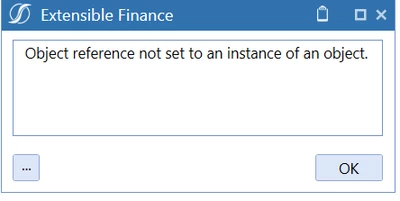
Need help on Error in BR- Object reference not set an instance of an object

  • January 2, 2024
  • 3 replies
  • 2 views

Hi Community members,

Need your help on the below business rule, as i am unable to identify the errors.

vasantharaidu_1-1704205899464.png

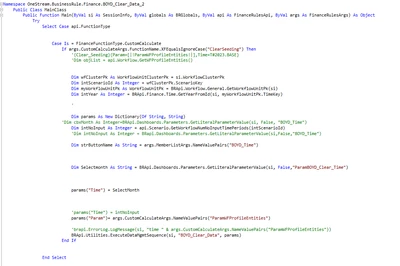
The rule wrote for to get the value from combobox value and run Data managment sequence to clear the data.

Namespace OneStream.BusinessRule.Finance.BOYD_Clear_Data_2

Public Class MainClass
	Public Function Main(ByVal si As SessionInfo, ByVal globals As BRGlobals, ByVal api As FinanceRulesApi, ByVal args As FinanceRulesArgs) As Object
		Try
			Select Case api.FunctionType
			Case Is = FinanceFunctionType.CustomCalculate
				If args.CustomCalculateArgs.FunctionName.XFEqualsIgnoreCase("ClearSeeding") Then
					'{Clear_Seeding}{Param=[|!ParamWFProfileEntities!|],Time=T#2023.BASE}
					'Dim objList = api.Workflow.GetWFProfileEntities()
					Dim wfClusterPk As WorkflowUnitClusterPk = si.WorkflowClusterPk
					Dim intScenarioId As Integer = wfClusterPk.ScenarioKey
					Dim myWorkflowUnitPk As WorkflowUnitPk = BRApi.Workflow.General.GetWorkflowUnitPk(si)
					Dim intYear As Integer = BRApi.Finance.Time.GetYearFromId(si, myWorkflowUnitPk.TimeKey)
					'
					Dim params As New Dictionary(Of String, String)
					'Dim cbxMonth As Integer=BRApi.Dashboards.Parameters.GetLiteralParameterValue(si, False, "BOYD_Time")
					Dim intNoInput As Integer = api.Scenario.GetWorkflowNumNoInputTimePeriods(intScenarioId)
					'Dim intNoInput As Integer = BRapi.Dashboards.Parameters.GetLiteralParameterValue(si,False,"BOYD_Time")
					Dim strButtonName As String = args.MemberListArgs.NameValuePairs("BOYD_Time")
					Dim Selectmonth As String = BRApi.Dashboards.Parameters.GetLiteralParameterValue(si, False, "ParamBOYD_Clear_Time")
					params("Time") = SelectMonth
					'params("Time") = intNoInput
					params("Param") = args.CustomCalculateArgs.NameValuePairs("ParamWFProfileEntities")
					'brapi.ErrorLog.LogMessage(si, "time " & args.CustomCalculateArgs.NameValuePairs("ParamWFProfileEntities"))
					BRApi.Utilities.ExecuteDataMgmtSequence(si, "BOYD_Clear_Data", params)
				End If
			End Select

vasantharaidu_0-1704205754115.png


Best answer by MarcusH

Whenever I get this error my heart sinks because it can be a nightmare to troubleshoot especially when the error comes from a BR you are not working on. I always use a variable to capture what the BR is doing at various points in the script (eg "Getting workflow settings") and then add the contents of that variable to any error message. It saves me an enormous amount of time. I have documented how to do it here

3 replies

January 2, 2024

Hi vasantharaidu , 

The error means that one of your variables is null while being evaluated as if it has a value.  This usually happens when an assignment fails.  e.g. this line: 

params("Param")= args.CustomCalculateArgs.NameValuePairs("ParamWFProfileEntities")

as a matter of practice, you should code: 

params("Param")= args.CustomCalculateArgs.NameValuePairs("ParamWFProfileEntities")

as:

dim paramVal = args.CustomCalculateArgs.NameValuePairs.XfGetValue("ParamWFProfileEntities", String.Empty)
params("Param") = paramVal

Logical Half-Splitting to isolate a bug:
To troubleshoot your code, put a known working line of code: BRApi.ErrorLog.LogMessage(si, "DEBUG")  about 1/2 way in your code.  if you see "DEBUG" in the log, the line causing the error is below "BRApi.ErrorLog.LogMessage(si, "DEBUG") ".  if not, its above the statement.  Move the debug statement accordingly until you are next to the line causing the null pointer.

January 2, 2024

Next time, before you post code (which you're welcome to do!), please check out these instructions. Well-formatted code is more likely to attract good responses.

MarcusHAnswer
January 5, 2024

Whenever I get this error my heart sinks because it can be a nightmare to troubleshoot especially when the error comes from a BR you are not working on. I always use a variable to capture what the BR is doing at various points in the script (eg "Getting workflow settings") and then add the contents of that variable to any error message. It saves me an enormous amount of time. I have documented how to do it here