
June 6, 2024
Solved

PLP: Complete Workflow issue

  • June 6, 2024
  • 1 reply
  • 0 views

This is a doubt with the rest of the questions I have, and is that in the new workflow I created, when I hit complete worklfow there are two data management that are not executed (COPY_PLP_TO_PLN, PROCESS_PLP), which are below, but I try it in other workflows and it works correctly.

Then I wanted to know how I can solve this in the new workflow, so that when I complete the workflow it also runs those data management as in the others.

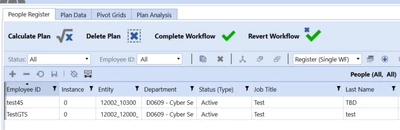
Marco_1-1717694545223.png


Marco_0-1717694087858.png


Best answer by aformenti

That does not seem to be the action triggered on clicking the Complete Button but the calculate plan.

I suggest you work backwards from the PLP Dashboard in Design Mode to see which Business Rule and Function the button is calling. Once you have the Business Rule identified, you will see something like this which is triggering the Data Management Job:

BRApi.Utilities.StartDataMgmtSequence(si, m_DataMgmtCalcSequenceName, params)
or
BRApi.Utilities.StartDataMgmtSequence(si, m_DataMgmtCalcSequenceName, params)


1 reply

June 6, 2024

HI Marco ,

Must be something in the Dashboard Extender Business Rule that its executed when you click the Complete Button. Something likely referencing the Workflow name..

If you share the code we can take a look.


MarcoAuthor
June 6, 2024

Hi Aformenti.

the problem is that this functionality is being extended to other BRs and other data management, but from what I have checked, none of them send a call to the ones I need for the steps.

(Rule) PLP_SolutionHelper - > CalculatePlan -> (Function) CalculatePlanMain -> ( Function)CalculateSinglePlanDataMgmt -> (Data Management) CalculatePlan_PLP -> PLP_DataMgmt -> Singlecalc (yes) -> PLP_SolutionHelper -> CalculateSinglePlan

Else If (args.FunctionName.XFEqualsIgnoreCase("CalculatePlan"))
	selectionResult = Me.CalculatePlanMain(si, globals, api, args)							
	If Not Me.m_CustomEvents Is Nothing Then Me.m_CustomEvents.AfterSelectionChangedEvent(si, globals, api, args, selectionResult)
Return selectionResult


aformentiAnswer
June 6, 2024

That does not seem to be the action triggered on clicking the Complete Button but the calculate plan.

I suggest you work backwards from the PLP Dashboard in Design Mode to see which Business Rule and Function the button is calling. Once you have the Business Rule identified, you will see something like this which is triggering the Data Management Job:

BRApi.Utilities.StartDataMgmtSequence(si, m_DataMgmtCalcSequenceName, params)
or
BRApi.Utilities.StartDataMgmtSequence(si, m_DataMgmtCalcSequenceName, params)