
May 11, 2023
Solved

Return message on successfully completed extensibility rule

  • May 11, 2023
  • 1 reply
  • 0 views

Hi,

I have a data management step which runs an extensibility rule.


In the rule I am using the “Throw New XFUserMsgException” command to return error messages.

For example:

Throw New XFUserMsgException(si,"","","Error: Copy cannot be completed. Source Scenario/Year must be different from target Scenario/Year")

Gives the following result when conditions are met:
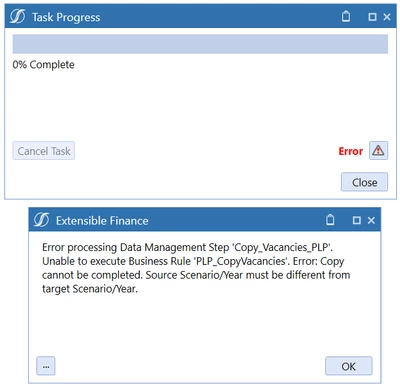
AndreaF_2-1683801410861.png


When the step completes without error a box message appears, like the following one:
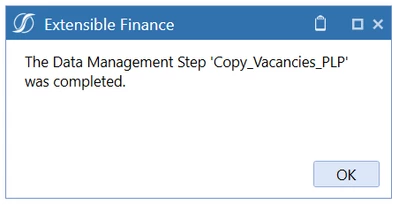
AndreaF_3-1683801410862.png


How can I control the message shown when the step is successfully completed? I.e., how do I return a message in a box message without throwing an error?

Best answer by JackLacava

If you want that level of control of the interaction with users, you should probably launch the job from a Dashboard Extender instead. At that point you're in the driver seat and can decide what to display and when. DM steps and sequences are meant as background jobs managed by the system.

1 reply

May 12, 2023

If you want that level of control of the interaction with users, you should probably launch the job from a Dashboard Extender instead. At that point you're in the driver seat and can decide what to display and when. DM steps and sequences are meant as background jobs managed by the system.