
May 29, 2024
Solved

Running DM package from the BR and completing the workflow step

  • May 29, 2024
  • 9 replies
  • 15 views

I would like to give my users the ability to launch the DM sequence from the workflow step. I have the dashboard with the button that passes the parameters to the DM package and launches the package. The last step in the DM sequence runs the Extensibility BR that completes the workflow step. Everything seems to work except that the workflow step window does not refresh after the sequence completion. The workflow step appears incomplete even though it is. The click on the "refresh Application" icon is required.

Is there a way to address it?

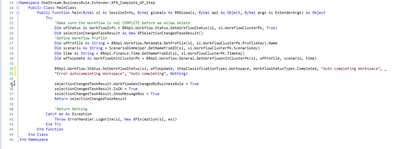
My Extensible BR is below:

YanSavinsky_0-1716998161849.png


Best answer by MikeG

Create 1 Dashboard Extender rule with 2 functions - one to Complete and one to Revert.  Do not do this by way of a DM Sequence.  There is no API for Refresh Application.  Take 1 step back to take 2 steps forward.

Hope this helps!

9 replies

May 29, 2024

Hi YanSavinsky 

Try either setting a Refresh of the Main dashboard via your button.  Or you can do the same with the XFSelectionChangedTaskResult object in a Dashboard Extender Business Rule.  See example below


' Usage: {WF_SolutionHelper}{CompleteWorkflow}{WFProfile = [|WFProfile|], Scenario = [|WFScenario|], Time = [|WFTime|]}
If args.FunctionName.XFEqualsIgnoreCase("CompleteWorkflow") Then
	' Pass in variables
	Dim profileName As String = args.NameValuePairs.XFGetValue("WFProfile")
	Dim scenario As String = args.NameValuePairs.XFGetValue("Scenario")
	Dim time As String = args.NameValuePairs.XFGetValue("Time")

	' Create WorkflowUnitClusterPk from variables passed in from dashboard
	Dim wfClusterPK As WorkflowUnitClusterPk = BRApi.Workflow.General.GetWorkflowUnitClusterPk(si, profileName, scenario, time)
	' BRApi used to complete a workspace
	BRApi.Workflow.Status.SetWorkflowStatus(si, wfClusterPK, StepClassificationTypes.Workspace, WorkflowStatusTypes.Completed, "Workspace Completed", String.Empty, "Admin clicked complete workflow", Guid.Empty)
					
	' Declare XFSelectionChangedTaskResult				
	Dim selectionChangedTaskResult As New XFSelectionChangedTaskResult()						
	' Use to update the wfstatus automatically
	selectionChangedTaskResult.WorkflowWasChangedByBusinessRule = True
	selectionChangedTaskResult.IsOK = True							
	' Used to refresh a named dashboard e.g. 0_Frame_XXX -> Update string below with your dashboard name
	selectionChangedTaskResult.ChangeSelectionChangedUIActionInDashboard = True	
	selectionChangedTaskResult.ModifiedSelectionChangedUIActionInfo.SelectionChangedUIActionType = XFSelectionChangedUIActionType.Refresh
	selectionChangedTaskResult.ModifiedSelectionChangedUIActionInfo.DashboardsToRedraw = "[Enter the dashboard name that you want to refresh here]"			
	Return selectionChangedTaskResult
	
End If


May 29, 2024

In the properties for the button your user clicks to launch the DM, Set the User Interface Action to "Refresh" and select the dashboard where your workflows are shown in the Dashboards to Redraw


RobbSalzmann_0-1717001109408.png


May 29, 2024

Thank you, Rob and Sam!

Unfortunately using the "User Interface Action" properties of the button does not do the trick. Refreshing the dashboard manually does not work either, neither does reloading the dashboard by clicking on the workflow step in the period area of the workflow screen. The only thing that does work is clicking the "Refresh Application" icon on the top right of the Windows Client window.

Currently my button is launching the DM sequence and the last step in the sequence launches the BR that completes the workflow. It is the "extensibility" BR. My understanding is that "Extensibility" type of BR is the only flavor of BR that can be launched via DM step. When I tried to specify the Dashboard Extender rule in the DM step it generates an error on execution: "Invalid Business Rule"

I wonder if my option is to have my button launch the BR and that BR launch the DM sequence and complete the workflow?


May 29, 2024

Hi YanSavinsky 

It should be a Dashboard Extender (not an Extensibility rule) - And it should be a ComponentSelectionChanged type of DashboardExternderFunctionType.


MikeG_0-1717007512906.png


MikeG_1-1717007554610.png


MikeG_2-1717007656069.png


Those are excerpts from a larger rule but the keys are:

- Dashboard Extender Rule > Extender Function Type is ComponentSelectionChanged > The specific function you are calling (important because you can have 1 rule that does both the Complete and Revert actions.  > WorkflowWasChangedByBusinessRule = True > End the Rule with a Return TaskResult.

This will refresh the Workspace - and for sanity - make sure you Workflow is of Type Workspace.

Best,


May 29, 2024

Example calling the Dashboard Extender:


MikeG_3-1717007892660.png


May 29, 2024

Thank you, Mike!

Here is my issue: my current setup actually works exactly as I intended: there is a button on my dashboard that launches the DM sequence. The last step in that sequence runs the BR that completes the workflow step, which is type "Workspace". That rule DOES complete the step. The problem is that this step does not show as completed. The only way to make it show as completed is for the user to click on the "Refresh Application" icon.

In addition, on my dashboard I also have 2 buttons to complete and revert the workflow. These buttons are configured with the call to the Dashboard Extender, as you advised, and they work fine.

I wonder if there is a method in BRApi to "Refresh Application"?


YanSavinsky_0-1717010264667.png

YanSavinsky_1-1717010277812.png


MikeGAnswer
May 29, 2024

Create 1 Dashboard Extender rule with 2 functions - one to Complete and one to Revert.  Do not do this by way of a DM Sequence.  There is no API for Refresh Application.  Take 1 step back to take 2 steps forward.

Hope this helps!

June 3, 2024

Thank you very much, Fred.

I came to the same conclusion: instead of using DM steps to launch business rules, in which case I am limited to the Extensibility type rules, I need to create the Dashboard Extender rule to both check the status of the workflow, execute the DM sequence and complete the workflow step if DM sequence completes without errors.

Once I test it successfully, I will post the code here for reference.

June 5, 2024

As promised, here is the complete Dashboard Extender rule that is now being launched from the dashboard button.

I do have another issue manifest itself: lines 40 - 46 in the below sample are there to terminate the business rule if the DM sequence does not complete successfully. It does not work. I made my DM sequence error out during various steps and the condition of " If (objTaskActivityItem.HasError) Then ' -- If DM Sequence generates errors " is not being triggered. I can see entries being generated in the error log.

Namespace OneStream.BusinessRule.DashboardExtender.EPU_SolutionHelper
	Public Class MainClass
		Public Function Main(ByVal si As SessionInfo, ByVal globals As BRGlobals, ByVal api As Object, ByVal args As DashboardExtenderArgs) As Object
			Try
				Select Case args.FunctionType
				Case Is = DashboardExtenderFunctionType.ComponentSelectionChanged
	  				If (args.FunctionName.XFEqualsIgnoreCase("ExecuteEPUProcess")) Then

					Dim wfProfileKey As Guid = si.WorkflowClusterPk.ProfileKey
					Dim wfProfile As String = BRApi.Workflow.Metadata.GetProfile(si, si.WorkflowClusterPk.ProfileKey).Name
					Dim scenario As String = ScenarioDimHelper.GetNameFromID(si, si.WorkflowClusterPk.ScenarioKey)
					Dim time As String = BRApi.Finance.Time.GetNameFromId(si, si.WorkflowClusterPk.TimeKey)
					Dim wfToUpdate As WorkflowUnitClusterPk = BRApi.Workflow.General.GetWorkflowUnitClusterPk(si, wfProfile, scenario, time)						
	                Dim wfStatus As WorkflowInfo = BRApi.Workflow.Status.GetWorkflowStatus(si, si.WorkflowClusterPk, True)
					Dim calcEntity As String = BRApi.Dashboards.Parameters.GetLiteralParameterValue(si,"False","WFEPUEntity")
					Dim EPU_DM_Sequence As String = args.NameValuePairs.XFGetValue("EPU_DM_Sequence", Nothing)
					Dim EPU_Entity_Selection_S4 As String = args.Namevaluepairs.XFGetValue("EPU_Entity_Selection_S4",Nothing)
					Dim EPU_Period As String = args.Namevaluepairs.XFGetValue("EPU_Period",Nothing)


					'Make sure the Workflow is not Complete or Locked before proceeding with DM Sequence
					If (wfStatus.Locked)
						Throw New System.Exception ("EPU Process could not be executed. EPU Workflow Step is locked.")
					Else If wfStatus.GetOverallStatus().Equals(WorkflowStatusTypes.Completed)
						Throw New System.Exception ("EPU Process could not be executed. EPU Workflow Step is complete.")
					End If
						

					Dim selectionChangedTaskResult As New XFSelectionChangedTaskResult()
					selectionChangedTaskResult.IsOK = False
					selectionChangedTaskResult.ShowMessageBox = True

				    'Launch data management sequence
					 Dim customSubstVars As New Dictionary(Of String, String) 'You can use this dictionary to pass on parameters to your DM Sequence
						customSubstVars.Add("EPU_Entity_Selection_S4", EPU_Entity_Selection_S4)
						customSubstVars.Add("EPU_Period", EPU_Period)
					 Dim objTaskActivityItem As TaskActivityItem = BRApi.Utilities.ExecuteDataMgmtSequence(si, EPU_DM_Sequence, customSubstVars)

					 If (objTaskActivityItem.HasError) Then ' -- If DM Sequence generates errors 
				     	selectionChangedTaskResult.Message = "EPU Process completed with errors."
				     	Return selectionChangedTaskResult
				     Else ' -- If DM Sequence completes successfully
				     	selectionChangedTaskResult.IsOK = True
				      	selectionChangedTaskResult.Message = "EPU Process has completed successfully."
						'Define Workflow Profile

					'Complete the workflow step if and when DM sequence completes sucessfully
						BRApi.Workflow.Status.SetWorkflowStatus(si, wfToUpdate, StepClassificationTypes.Workspace, WorkflowStatusTypes.Completed, "Auto completing Workspace", _
						"Error autocompleting Workspace", "Auto completing", Nothing)						
					    ' You can paste and adapt your existing WF Status Update code here
						selectionChangedTaskResult.WorkflowWasChangedByBusinessRule = True
						selectionChangedTaskResult.IsOK = True

		      				Return selectionChangedTaskResult									
	    			End If
	  				End If
				End Select

				Return Nothing
			Catch ex As Exception
				Throw ErrorHandler.LogWrite(si, New XFException(si, ex))
			End Try
		End Function
	End Class
End Namespace


June 5, 2024

Thanks for sharing your solution YanSavinsky 

I believe the error will get fixed if you add the following code to line 39:

objTaskActivityItem = BRApi.TaskActivity.GetTaskActivityItem(si, objTaskActivityItem.UniqueID)

Apologies for missing that statement in my original post, will edit not to confuse other people 🙂

Hope this helps.

June 5, 2024

Thank you, Fred! Worked beautifully.