
August 15, 2023

Show task progress dialog from BR

  • August 15, 2023
  • 2 replies
  • 0 views

Is it possible to show the task progress dialog (see picture below) of a DM task started in a BR.


Dim task As TaskActivityItem = BRApi.Utilities.ExecuteDataMgmtSequence(...)
' Do something with task to show dialog?
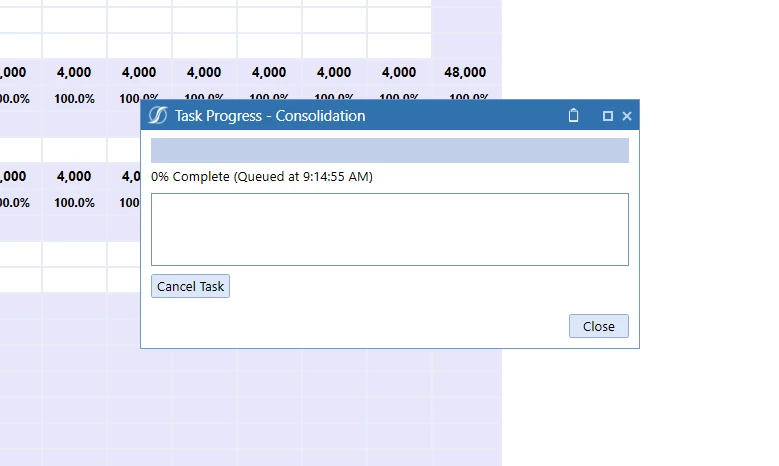
 

consolidate task progress.png

Or is there another way to consolidate from a BR, where it automatically shows the progress dialog?

Context: Button -> Dashboard Extender BR to change params -> DM sequence -> Consolidate. I need the Dashboard Extender API on same button press to change params, so can't call the DM/consol directly from button press.

2 replies

August 15, 2023

Hi Jasper

You can use this.

BRApi.TaskActivity.UpdateRunningTaskActivityAndCheckIfCanceled(si, args, StepInfo, percentCompleteToAdd as Decimal) 

Omkareshwar_0-1692105140196.png


JasperAuthor
August 15, 2023

I tried, there doesn't seem to be a way to use that API to show the dialog related to a certain task started from a a Dashboard Extender rule.

JasperAuthor
August 15, 2023

This post says it's not possible.

https://community.onestreamsoftware.com/t5/Workflow-and-Data-Integration/Workspace-Data-management-job-Business-rule/td-p/17055

But, I'm able to run that API through BRApi.TaskActivity (as Omkareshwar says in his reply). However, that API seems to only allow changing the percentage and description. Not show the dialog.

If that's the case, is there a way to use the `XFSelectionChangedTaskResult` API from an Extensibility rule?