
November 6, 2023

Solution to Update Task Scheduler Start Times to Account for Daylight Savings

  • November 6, 2023
  • 6 replies
  • 8 views

Hi, 

This time of year we have the common maintenance point regarding needing to update task scheduler start times to account for daylight savings. It is expected for the platform to not automatically update the task start times to account for daylight savings, thus, this becomes a maintenance point for those companies in states/countries that utilize daylight savings. Until this feature perhaps one day becomes available in the platform, we have a custom solution that will make the maintenance point of this easier for OS administrators. 

You can upload the two files attached in the zip file which will result in uploading an Extender business rule titled "Update_TaskScheduler_StartTimes" and a Data Management job called "Update Task Start Time Daylight Savings".

To use the solution, navigate to the Data Mgmt page and look for the group titled "Task Scheduler Maintenance". Here you will find the Data Mgmt sequence and step you uploaded.

Navigate to the DM step and utilize the Hour Adjustment parameter to push the task start times backwards (-1) or forward (1) one hour. 
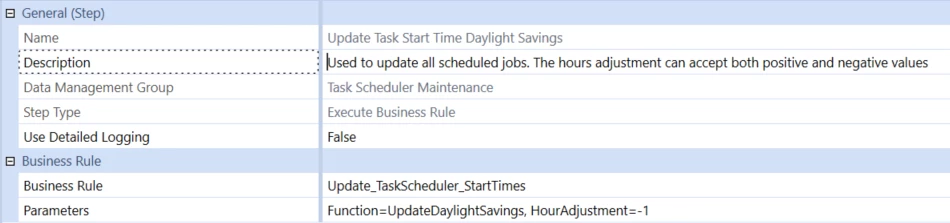
UpdateTasksDaylightSavingsDMStep.png

Once you are happy with the Data Mgmt step setting, go ahead and run the Update Task Start Time Daylight Savings sequence. The sequence will update the task start time for all tasks in the application.

We recommend testing this in a Development application first. Please perform this at your own risk in a Production application.
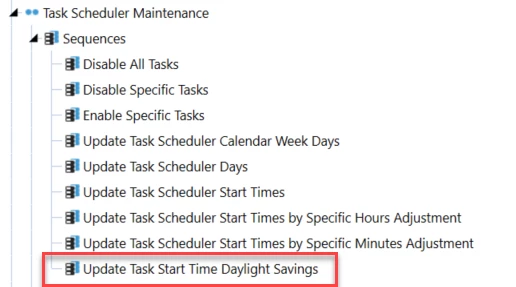

UpdateTasksDaylightSavingsDMSequence.png


6 replies

November 7, 2023

Nice one, Nick!

For the curious, the core of the code looks like this:

Dim dmSchedItem As List(Of DataMgmtScheduleItemEx) = _
	DataMgmtScheduleWcf.GetScheduledJobs(dbConnFW, dbConnApp, False)

For Each schedJob As DataMgmtScheduleItemEx In dmSchedItem

	'adjust the start time based on what the user defines
	schedJob.DataMgmtScheduleItem.StartTime = _
		schedJob.DataMgmtScheduleItem.StartTime.AddHours(Convert.ToDouble(hourAdjustment))

	' Function SaveScheduledJob(dbConnFW As DbConnInfo,dbConnApp As DbConnInfo,isNew As TriStateBool)
	DataMgmtScheduleWcf.SaveScheduledJob( _
		dbConnFW, dbConnApp, schedJob.DataMgmtScheduleItem, TriStateBool.FalseValue)

Next

That surfaces an interesting API to DM jobs that can have interesting applications. Cheers!

November 9, 2023

Thank you this is very useful information

March 11, 2024

NickKroppe I stumbled across your post here as once again we find ourselves in this predicament - always fun.  Of course I will test this first but I am curious about one item.  Example:  my tasks that are scheduled for 8:30 am and are showing on the task scheduler calendar as 8:30am are kicking off at 9:30 am due to the time change over the weekend.  Therefore, how they look on the calendar is correct but they are just kicking off at a time inconsistent with how they show on the calendar.  Will running the DM jobs you have attached, change how they look on the task scheduler calendar?  I do not want to change the time they are showing as on the calendar.  I just want to sync they time they are kicking off with how they are showing on the calendar.  Does that make sense?

Thank you

Denise

March 11, 2024

Hi Denise, I'm not 100% sure to be honest. I would suggest to test the solution in a DEV application first to confirm. Are you able to try running the solution to alter task scheduler times in DEV?

March 11, 2024

I will have to check.  Usually when we refresh Dev with a copy of Production I will delete all the scheduled tasks in Dev as I do not want then running there.  I will have to see if Dev has an old task or two on the calendar that was put there before the time change this past weekend.  Thank you for your help.

March 11, 2024

I have the same question as Denise.  I tested in my Dev application and it does move the time on the Task Scheduler.  My tasks show the correct time in Prod on my Task Scheduler (which were setup before the time change this past weekend) and are now running an hour ahead (8:00 am task ran at 9:00 am).

November 1, 2024

Thank you for starting this thread.  Is anyone aware if there was a change made in any of the newer versions of OneStream where the tasks do adjust automatically for daylights savings time changes?  I assume not, but worth asking.

November 4, 2024

DISCLAIMER: This post includes forward-looking statements, which should not be relied on for trading or any other purposes, as they do not imply any guarantee of delivery at any point in time.

It's in the very later stages of development, we're currently running the last few tests and if everything goes to plan it will appear very very soon. 🙊

December 5, 2024

Hi, has the task scheduler ever been fixed?  So many issues because all the tasks are scheduled in UTC... If so which version?

December 6, 2024

DISCLAIMER: This post includes forward-looking statements, which should not be relied on for trading or any other purposes, as they do not imply any guarantee of delivery at any point in time.

Bar dramatic unforeseen events, it will be in the very next release, 8.5.

March 16, 2026

Hi JackLacava, has this solution been released yet? I'm currently on v9.2 and recently experienced the issue where my schedule is not automatically updated to reflect the change in daylight savings.