
November 21, 2024

SQL Manipulation with a VB Net Variable

  • November 21, 2024
  • 2 replies
  • 1 view

Hello,

Does anyone know an effective way to alter the amount column of a table using a SQL script?

Use case: the client is bringing in what they call "Production Downtime" to the system, which shows hours of downtime by plant based on a reason (attribute). Using a Dashboard Data Set rule, I created a SQL query to return specific results from the stage table based on Entity and Plant selections. This rule is linked to a data adapter and fed into the BI Viewer.

In their BI Viewer report, it shows current Month vs PY Month. Since this data is coming in daily, when the user is looking at the current month, (today is Nov 21) the current month shows 21 days' worth of downtime data. They would like the PY Month to also represent 21 days of data.

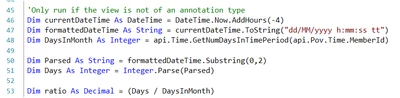
So, I would like to create a "ratio" variable that reads the current day of month and divides by the total days in month, and multiply the PY data by it. I created something similar in a UD8 calc:

danszczepanski_0-1732196070292.png

(SQL Is not my strong suit) how can I apply this "ratio" to the amount column of a SQL query? 

Amount * Ratio 

2 replies

November 21, 2024

Hi,

There are a number of ways you can crack this nut. As you are using a Dashboard Dataset rule you can manipulate the contents of the dataset returned by your SQL query before returning it to the data adapter which feeds into the BI Viewer report. The other option is to create calculated fields directly in the BI Viewer dataset to represent the ratio and apply this to a new calculated amount i.e. RatioAmount 

November 26, 2024

Hello,

Since I am not the most proficient SQL, I tried the calculated field in the BI Viewer itself.

A few issues I am having:

  • The BI Viewer does not have a "Day in Month" but has a "Day in Week" and "Day in Year". I may be able to combine a few to get to "Day in Month" instead.
  • I need the calculated field to ONLY apply to prior year actuals IF the user is in the current month of the year. I'm not sure how the system would understand when to apply the calculated field to the PY data unless I used business rule type logic.
November 22, 2024

It would be easier to give you query guidance if we knew what we are querying.  tell us about your table, its columns... Or at least the query you're wanting to update.

Given what you provided, this might help:


DECLARE @currentDateTime DATETIME = DATEADD(HOUR, -4, GETDATE()) -- Step 1: Adjust current date by subtracting 4 hours
DECLARE @formattedDateTime VARCHAR(20) = CONVERT(VARCHAR, @currentDateTime, 103) -- Step 2: Format date to dd/MM/yyyy
DECLARE @dayOfMonth INT = DAY(@currentDateTime) -- Step 3: Extract day of the month
DECLARE @daysInMonth INT = DAY(EOMONTH(@currentDateTime)) -- Step 4: Get the number of days in the current month

-- Step 5: Calculate the ratio (Day / DaysInMonth)
DECLARE @ratio DECIMAL(5, 4) = CAST(@dayOfMonth AS DECIMAL) / @daysInMonth

SELECT @ratio AS Ratio;


November 26, 2024

Thanks for your response, Rob.

Here is a snippet of my query and what it returns. There is more to it (needs to return a different query based on parameter selections), but similar queries are being ran regardless of their selections.


danszczepanski_0-1732635463638.png


danszczepanski_1-1732635544171.png

I am running a union on the time, so I get Current Period and Prior Year (Same period) so they can compare on a graph. 

I do believe adding in another column where the ratio is applied would be the best approach, but it is a matter of getting it into this business rule. I will try to apply what you have provided me with, thank you. Let me know if you have any further suggestions.


Employee
November 26, 2024

Hi danszczepanski 

Since you mentioned SQL is not your strong suit, before going further I would strongly suggest you have a look at this article and understand how to pass parameters/variables into your SQL the right way. It is less error prone and less of a security risk: https://community.onestreamsoftware.com/t5/Community-Blog/SELECT-Like-a-Boss-With-Query-Parameters/ba-p/22426

- Daniel