
Solved
Tree view showing full hierarchy
Hi everyone,
Thanks in advance for helping.
I am new to tree views and trying to get a simple hierarchy (from the account dimension) to show as a tree view. Part of the structure is shown in the screenshot below:
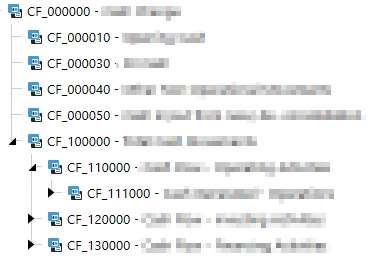
I'm using the following Dashboard Data Set Business Rule that I run using a data adapter linked to my tree view:
If args.DataSetName.XFEqualsIgnoreCase("TreeView")
	'Declare the account dimPK
	Dim DimPk As DimPk = BRApi.Finance.Dim.GetDimPk(si, "actAccount")
	'Declare the parent ID + member
	Dim parentMbrId As Integer = BRApi.Finance.Members.GetMemberId(si, dimTypeId.Account, "CF_000000")
	Dim parentMbr As Member = BRApi.Finance.Members.GetMember(si, dimTypeId.Account, parentMbrId)
	'Declare the child list of the parent
	Dim childList As List(Of Member) = BRApi.Finance.Members.GetChildren(si, DimPk, ParentMbrId)
	'Dim the new XFTreeItem List + properties
	Dim treeChildren As New List(Of XFTreeItem)
	Dim textColour As String = XFColors.Black.Name
	Dim imageSource As String = XFImageFileSourceType.ClientImage
	Dim imageName As String = XFClientImageTypes.StatusGrayBall.Name
	Dim isBold As Boolean = False
	Dim isEnabled As Boolean = True
	Dim isSelected As Boolean = False
	Dim isExpanded As Boolean = True
	'Loop through the children
	For Each child As Member In childList
		treeChildren.Add( _
			New XFTreeItem( child.Name, child.NameAndDescription, textColour, _
				isBold, isEnabled, isSelected, isExpanded, imageSource, imageName, _
				child.Name, Nothing))
	Next child

	'Add the children to the parent
	Dim treeCollection As New XFTreeItemCollection
	treeCollection.TreeItems.Add( _
		New XFTreeItem( parentMbr.Name, parentMbr.NameAndDescription, textColour, _
			isBold, isEnabled, isSelected, isExpanded, imageSource, imageName, _
			parentMbr.name, treeChildren))
	Return treeCollection.CreateDataSet(si)
End If
I know the code is far from done. However, the output is currently looking like this:
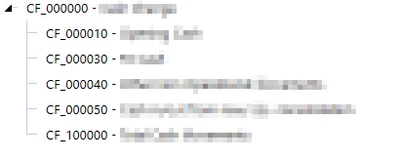
Can someone help me with getting the next 'layers' of the hierarchy in place? Under CF_100000 etc?
Any help is appreciated!
Thanks a lot.
Floris