
April 6, 2022

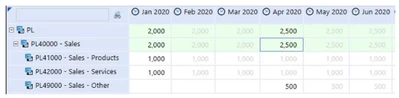
UD8 Dynamic rule to hide derived values. Does anyone have an example of this UD8 calc?
  • April 6, 2022
  • 3 replies
  • 1 view


Ando_0-1649262269991.png


•You can set a text color on the Cubeview (i.e black) so all values show in a single colour, which would override the default grey/black.

•You can also use a UD8 dynamic rule to hide derived values in future periods, if necessary.

3 replies

April 7, 2022

This script won't hide the data, but will allow you to edit the colour of your derived data:

If (IsDerivedData = True) Then TextColor = Transparent

You can put that in your "Cell Format" for your applicable columns/rows.

Not sure if that helps?

AndoAuthor
April 7, 2022

Would also want it hidden in a quick view in excel and don’t think this would accomplish that

April 7, 2022

I've used this in the past and it has worked. It goes in a UD8 member. I named mine No_Derived, but it can be whatever you want.

Dim ViewMember As ViewMember = ViewMember.GetItem(api.Pov.View.MemberPk.MemberId)

''''''Suppress Derived Data'''''''
If ViewMember.IsAnnotationType = False Then
If api.Data.GetDataCell("U8#None").CellStatus.IsDerivedData = False Then
Return api.Data.GetDataCell("U8#None")
Else
Return Nothing
End If
Else
Return Nothing
End If

August 24, 2023

Hi Michel, 

Would that dynamic rule apply to all derived data? I am looking to hide only the derived data in future periods.

Kind regards, 

Adriaan

August 24, 2023

You could adjust it to look at the time. I have not tested the below, Are you using Global Time? If so, you could add...

Dim povTime as String = api.Pov.Time.MemberId

dim GlobalTime as String = BRApi.Workflow.General.GetGlobalTime(si)

'Convert Times to numerical

Dim myTime as Integer = povTime.Substring(0,4) & if povTime.Length = 6 then "0" &  povTime.Substring(povTime.Length - 5) else povTime.Substring(povTime.Length - 5) 

Dim GlblTime as Integer = GlobalTime.Substring(0,4) & if GlobalTime.Length = 6 then "0" &  GlobalTime.Substring(GlobalTime.Length - 5) else GlobalTime.Substring(GlobalTime.Length - 5) 

if myTime > GlblTime then 

If ViewMember.IsAnnotationType = False Then
If api.Data.GetDataCell("U8#None").CellStatus.IsDerivedData = False Then
Return api.Data.GetDataCell("U8#None")
Else
Return Nothing
End If
Else
Return Nothing
End If

End If


You may have to tweak this a little bit, as I've written it off the top of my head, but it should be close to what you need. So, if the Global Time is 2023M8, and the pov Time is 2023M9, it will hide the derived data. If the pov Time is 2023M7, it won't.

December 9, 2025

Hi, Does anyone know how to hide those grey numbers from excel?