
April 18, 2025
Solved

Updating Business Rule from WFYEAR to Global POV

  • April 18, 2025
  • 3 replies
  • 1 view

Hello,

I am trying to update a business rule that is currently set to WFYear to the Global Time. We use the SAP Selector Solution, but I am new to it. Currently the WFYear of the user who schedules a trial balance import impacts what data is being loaded. For example, if the user's WF POV is 2024, then data is pulling from the source for 2024. I appreciate any suggestions. 

Original Rule
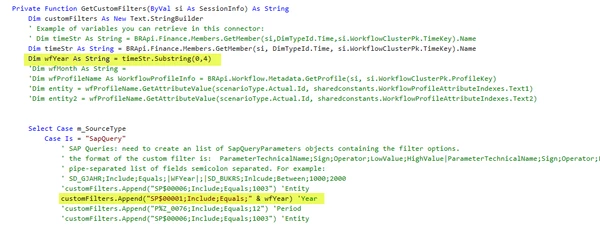


This is one idea I had, I am not sure T#|Global| will work since it is not a local variable. I also don't know if I need to change the "Dim wfYear As String = timeStr.Substring(0,4)" script.
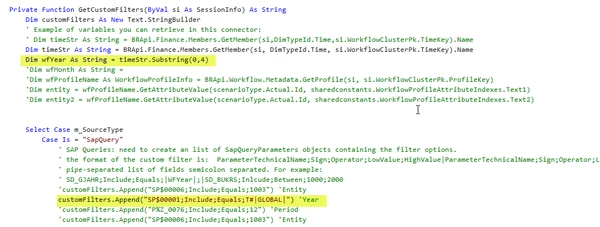


Thanks,

Ronnie

Best answer by RobbSalzmann

Thanks RobbSalzmann​ for the help!

So this code needs to be added:

Dim wfYear As String = BRApi.Workflow.General.GetGlobalTime(si);

wfYear = wfYear.SubString(0,2)

This code needs to be commented out:

Select Case m_SourceType
                Case Is = "SapQuery"
                    ' SAP Queries: need to create an list of SapQueryParameters objects containing the filter options.
                    ' the format of the custom filter is:  ParameterTechnicalName;Sign;Operator;LowValue;HighValue|ParameterTechnicalName;Sign;Operator;LowValue;HighValue
                    ' pipe-separated list of fields semicolon separated. For example:
                    ' SD_GJAHR;Include;Equals;|WFYear|;|SD_BUKRS;Inlcude;Between;1000;2000
                    'customFilters.Append("SP$00006;Include;Equals;1003") 'Entity
                    customFilters.Append("SP$00001;Include;Equals;" & wfYear) 'Year
                    'customFilters.Append("P%Z_0076;Include;Equals;12") 'Period
                    'customFilters.Append("SP$00006;Include;Equals;1003") 'Entity

Thanks so much!


Yes, you've got it!  Also apologize for the typo:
wfYear = wfYear.SubString(0,2)
should be 
wfYear = wfYear.SubString(0,4)

3 replies

April 18, 2025

Ronnie​ You can get the global time using
Dim wfYear as String = BRApi.Workflow.General.GetGlobalTime(si);

wfYear = wfYear.SubString( 0, 4 )

RonnieAuthor
April 18, 2025

Thanks RobbSalzmann​! This is very helpful! I have two more questions.

  1. Like this in the first highlighted section?
  2. I assume I would just comment out the second highlighted section below since that isn't needed, right?


April 18, 2025

I can't read your code, too blurry.  The forum doesn't do a very good job with images.  Try pasting your code using the code block


RonnieAuthor
April 18, 2025

Hi RobbSalzmann​ - Sorry about that, let me know if this is better

Original code

Private Function GetCustomFilters(ByVal si As SessionInfo) As String
            Dim customFilters As New Text.StringBuilder
            ' Example of variables you can retrieve in this connector:
            ' Dim timeStr As String = BRApi.Finance.Members.GetMember(si,DimTypeId.Time,si.WorkflowClusterPk.TimeKey).Name
            Dim timeStr As String = BRApi.Finance.Members.GetMember(si, DimTypeId.Time, si.WorkflowClusterPk.TimeKey).Name
            Dim wfYear As String = timeStr.Substring(0,4)
            'Dim wfMonth As String = 
            'Dim wfProfileName As WorkflowProfileInfo = BRApi.Workflow.Metadata.GetProfile(si, si.WorkflowClusterPk.ProfileKey)
            'Dim entity = wfProfileName.GetAttributeValue(scenarioType.Actual.Id, sharedconstants.WorkflowProfileAttributeIndexes.Text1)
            'Dim entity2 = wfProfileName.GetAttributeValue(scenarioType.Actual.Id, sharedconstants.WorkflowProfileAttributeIndexes.Text2)
 
 
            Select Case m_SourceType
                Case Is = "SapQuery"
                    ' SAP Queries: need to create an list of SapQueryParameters objects containing the filter options.
                    ' the format of the custom filter is:  ParameterTechnicalName;Sign;Operator;LowValue;HighValue|ParameterTechnicalName;Sign;Operator;LowValue;HighValue
                    ' pipe-separated list of fields semicolon separated. For example:
                    ' SD_GJAHR;Include;Equals;|WFYear|;|SD_BUKRS;Inlcude;Between;1000;2000
                    'customFilters.Append("SP$00006;Include;Equals;1003") 'Entity
                    customFilters.Append("SP$00001;Include;Equals;" & wfYear) 'Year 
                    'customFilters.Append("P%Z_0076;Include;Equals;12") 'Period
                    'customFilters.Append("SP$00006;Include;Equals;1003") 'Entity

Updated Code

I updated row 6 with your suggestion. 

I think I can just comment out row 20 now. 

Currently rows 19, 21 & 22 are already commented out. 

Private Function GetCustomFilters(ByVal si As SessionInfo) As String
			Dim customFilters As New Text.StringBuilder
			' Example of variables you can retrieve in this connector:
			' Dim timeStr As String = BRApi.Finance.Members.GetMember(si,DimTypeId.Time,si.WorkflowClusterPk.TimeKey).Name
			Dim timeStr As String = BRApi.Finance.Members.GetMember(si, DimTypeId.Time, si.WorkflowClusterPk.TimeKey).Name
			Dim sGLTime As String = BRApi.Workflow.General.GetGlobalTime(si);
			'Dim wfMonth As String = 
			'Dim wfProfileName As WorkflowProfileInfo = BRApi.Workflow.Metadata.GetProfile(si, si.WorkflowClusterPk.ProfileKey)
			'Dim entity = wfProfileName.GetAttributeValue(scenarioType.Actual.Id, sharedconstants.WorkflowProfileAttributeIndexes.Text1)
			'Dim entity2 = wfProfileName.GetAttributeValue(scenarioType.Actual.Id, sharedconstants.WorkflowProfileAttributeIndexes.Text2)
 
 
			Select Case m_SourceType
				Case Is = "SapQuery"
					' SAP Queries: need to create an list of SapQueryParameters objects containing the filter options.
					' the format of the custom filter is:  ParameterTechnicalName;Sign;Operator;LowValue;HighValue|ParameterTechnicalName;Sign;Operator;LowValue;HighValue
					' pipe-separated list of fields semicolon separated. For example:
					' SD_GJAHR;Include;Equals;|WFYear|;|SD_BUKRS;Inlcude;Between;1000;2000
					'customFilters.Append("SP$00006;Include;Equals;1003") 'Entity
					customFilters.Append("SP$00001;Include;Equals;" & wfYear) 'Year
					'customFilters.Append("P%Z_0076;Include;Equals;12") 'Period
					'customFilters.Append("SP$00006;Include;Equals;1003") 'Entity

Thanks,

Ronnie

April 18, 2025
Private Function GetCustomFilters(ByVal si As SessionInfo) As String
    Dim customFilters As New Text.StringBuilder
    ' Example of variables you can retrieve in this connector:
    Dim wfYear As String = BRApi.Workflow.General.GetGlobalTime(si);
    wfYear = wfYear.SubString(0,4)
    'Dim wfMonth As String = 
    'Dim wfProfileName As WorkflowProfileInfo = BRApi.Workflow.Metadata.GetProfile(si, si.WorkflowClusterPk.ProfileKey)
    'Dim entity = wfProfileName.GetAttributeValue(scenarioType.Actual.Id, sharedconstants.WorkflowProfileAttributeIndexes.Text1)
    'Dim entity2 = wfProfileName.GetAttributeValue(scenarioType.Actual.Id, sharedconstants.WorkflowProfileAttributeIndexes.Text2)


    Select Case m_SourceType
        Case Is = "SapQuery"
            ' SAP Queries: need to create an list of SapQueryParameters objects containing the filter options.
            ' the format of the custom filter is:  ParameterTechnicalName;Sign;Operator;LowValue;HighValue|ParameterTechnicalName;Sign;Operator;LowValue;HighValue
            ' pipe-separated list of fields semicolon separated. For example:
            ' SD_GJAHR;Include;Equals;|WFYear|;|SD_BUKRS;Inlcude;Between;1000;2000
            'customFilters.Append("SP$00006;Include;Equals;1003") 'Entity
            customFilters.Append("SP$00001;Include;Equals;" & wfYear) 'Year
            'customFilters.Append("P%Z_0076;Include;Equals;12") 'Period
            'customFilters.Append("SP$00006;Include;Equals;1003") 'Entity


April 18, 2025

If you just need the year:

dim wfYear as String = BRApi.Workflow.General.GetGlobalTime(si)
wfYear = wfYear.SubString( 0, 4 )