
December 16, 2024
Solved

Using Conditional Input to Suppress CV Columns

  • December 16, 2024
  • 2 replies
  • 9 views

Hi All,
As the name states above I'm trying to dynamically modify suppression settings on a column in a CV based on a value selected in a parameter. So for example let's say if a user selects an option from a parameter I want to modify suppression settings on certain columns based on that selection choice. I have two questions:

  1. Is there a way to do this?
  2. If there is a way, how would this business rule/function be passed? In the CV? In the Cube? 

Thank You...Any assistance on this would be extremely helpful. 
Best answer by Pete

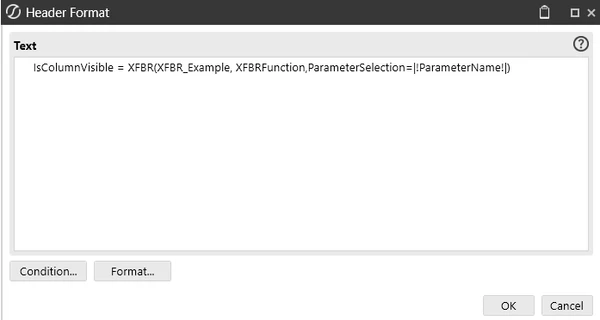
You would need to do this through an XFBR Business Rule and tying it into your CV Column Header format. 


how to call XFBRs in a cube view.


Namespace OneStream.BusinessRule.DashboardStringFunction.XFBR_Example
	Public Class MainClass
		Public Function Main(ByVal si As SessionInfo, ByVal globals As BRGlobals, ByVal api As Object, ByVal args As DashboardStringFunctionArgs) As Object
			Try
				'how to call: XFBR(XFBR_Example,XFBRFunction,ParameterSelection=|!ParameterName!|)
				If args.FunctionName.XFEqualsIgnoreCase("XFBRFunction") Then
					Dim sParam As String = args.NameValuePairs.XFGetValue("ParameterSelection", String.Empty)	
					
					If sParam.XFEqualsIgnoreCase("value1") Then
						Return "False"
					Else 
						Return "True"
					End If 

				End If

				Return Nothing
			Catch ex As Exception
				Throw ErrorHandler.LogWrite(si, New XFException(si, ex))
			End Try
		End Function
	End Class
End Namespace


2 replies

PeteAnswer
December 17, 2024

You would need to do this through an XFBR Business Rule and tying it into your CV Column Header format. 


how to call XFBRs in a cube view.


Namespace OneStream.BusinessRule.DashboardStringFunction.XFBR_Example
	Public Class MainClass
		Public Function Main(ByVal si As SessionInfo, ByVal globals As BRGlobals, ByVal api As Object, ByVal args As DashboardStringFunctionArgs) As Object
			Try
				'how to call: XFBR(XFBR_Example,XFBRFunction,ParameterSelection=|!ParameterName!|)
				If args.FunctionName.XFEqualsIgnoreCase("XFBRFunction") Then
					Dim sParam As String = args.NameValuePairs.XFGetValue("ParameterSelection", String.Empty)	
					
					If sParam.XFEqualsIgnoreCase("value1") Then
						Return "False"
					Else 
						Return "True"
					End If 

				End If

				Return Nothing
			Catch ex As Exception
				Throw ErrorHandler.LogWrite(si, New XFException(si, ex))
			End Try
		End Function
	End Class
End Namespace


PFowlerAuthor
December 17, 2024

Thank You totally blanked out on the iscolumnvisible formatting. I use this functionality in my dashboard but I didn't know if we can pass br's to the iscolumnvisible formatting for CVs. Thanks
