
July 7, 2023
Solved

Using ParamHelper for CubeViews (Scenario driven by Time Selected)

  • July 7, 2023
  • 1 reply
  • 0 views

Hi,


I am currently working on creating a ParamHelper business rule to be used in a CubeView. The goal is to have the S#scenario driven by the time dimension parameter selected by the user, rather than by the workflow time. For example, if T# contains M1, the scenario that should be returned is S#Projection. I would appreciate any pointers or guidance.


Thanks in advance for your help!
Best answer by RobbSalzmann

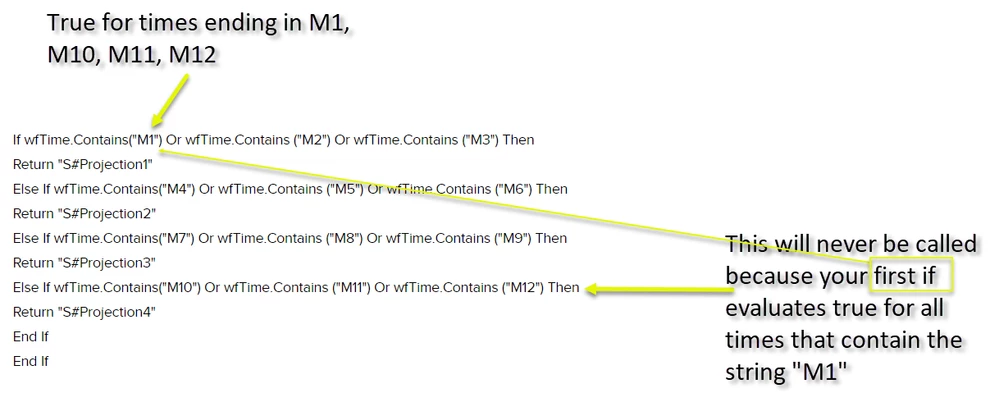
The code you posted will return as follows:
S#Projection1 for periods M1, M2, M3, M10, M11, and M12.
S#Projection2 for periods M4, M5, M6
S#Projection3 for periods M7, M8, M9
S#Projection4  - never

The code will never return "S#Projection4" because that If statement will never get called. See my first comment. above.


RobbSalzmann_0-1688916182129.png

You have a couple choices.  Use .EndsWith() or put this evaluation first:
If wfTime.Contains("M10") Or wfTime.Contains ("M11") Or wfTime.Contains ("M12") Then
Return "S#Projection4"

1 reply

July 7, 2023

Can you post what you have so far?  Might be easier to help you fix/adjust what you have vs trying to guess at what you might need.


Right off the bat I would recommend not using .Contains for this.

strTimeFilt.Contains("M1") will evaluate true for M1, M10, M11, and M12.

instead try:

strTimeFilt.EndsWith("M1")

GW4Author
July 7, 2023

Thanks for the suggestion. I was only able to create a functional one below that works based on workflow time, rather than user time parameter selection.

If args.FunctionName.XFEqualsIgnoreCase("GetScenarioByTime") Then
	'Get Time from current Workflow
	Dim myWorkflowUnitPk As WorkflowUnitPk = BRApi.Workflow.General.GetWorkflowUnitPk(si)
	Dim wfTime As String = BRApi.Finance.Time.GetNameFromId(si, myWorkflowUnitPk.TimeKey)

	If wfTime.Contains("M1") Or wfTime.Contains ("M2") Or wfTime.Contains ("M3") Then
		Return "S#Projection1"
	Else If wfTime.Contains("M4") Or wfTime.Contains ("M5") Or wfTime.Contains ("M6") Then
		Return "S#Projection2"
	Else If wfTime.Contains("M7") Or wfTime.Contains ("M8") Or wfTime.Contains ("M9") Then
		Return "S#Projection3"
	Else If wfTime.Contains("M10") Or wfTime.Contains ("M11") Or wfTime.Contains ("M12") Then
		Return "S#Projection4"
	End If
End If
July 9, 2023

The code you posted will return as follows:
S#Projection1 for periods M1, M2, M3, M10, M11, and M12.
S#Projection2 for periods M4, M5, M6
S#Projection3 for periods M7, M8, M9
S#Projection4  - never

The code will never return "S#Projection4" because that If statement will never get called. See my first comment. above.


RobbSalzmann_0-1688916182129.png

You have a couple choices.  Use .EndsWith() or put this evaluation first:
If wfTime.Contains("M10") Or wfTime.Contains ("M11") Or wfTime.Contains ("M12") Then
Return "S#Projection4"