May 18, 2023
Solved

When selecting multiple items in the list box only the first one is being passed to the Finance Rule

  • May 18, 2023
  • 1 reply
  • 0 views
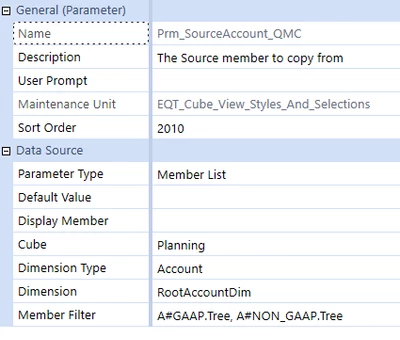
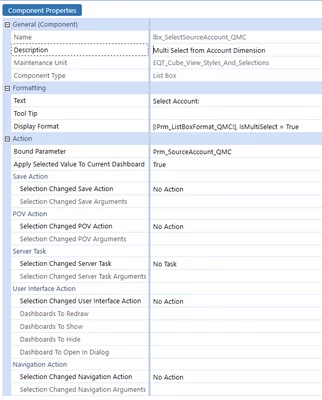
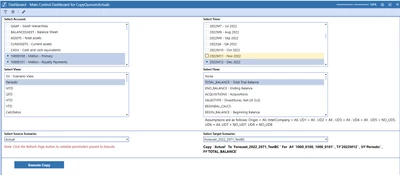
  • The display of the parameter shows 2 Accounts selected but when retrieving the parameter in the business rule only the first one is passed.
  • If I display the list box selections on the dashboard it shows the correct selections, comma separated.
  • If a comma is in the string that is passed to the Business rule, only the information before the comma is recognized. If there is no comma, the whole string is recognized.

 

RC_0-1684414211506.png


RC_1-1684414211512.png


RC_2-1684414211513.png


RC_3-1684414211518.png


Label:

Copy  '|!Prm_SourceScenario_QMC!|'  To '|!Prm_TargetScenario_QMC!| ' For  A# '|!Prm_SourceAccount_QMC!|' , T#'|!Prm_SourceTime_QMC!|' , V#'|!Prm_SourceView_QMC!|' , F#'|!Prm_SourceFlow_QMC!|'


Button:

{CopyQuorumToForecast_QMC}{Prm_SourceScenario_QMC=[|!Prm_SourceScenario_QMC!|], Prm_TargetScenario_QMC=[|!Prm_TargetScenario_QMC!|], Prm_SourceAccount_QMC=[|!Prm_SourceAccount_QMC!|], Prm_SourceTime_QMC=[|!Prm_SourceTime_QMC!|], Prm_SourceView_QMC=[|!Prm_SourceView_QMC!|], Prm_SourceFlow_QMC=[|!Prm_SourceFlow_QMC!|]}


    Best answer by EricOsmanski

    As long as you have [] around the parameter it should pass the entire comma separated string to the rule. I have never had an issue. Only when you don't have [] around the parameter does it pass only the first value. Looks like you do have the brackets appropriately in the button, though.

    Can you screenshot the button?

    1 reply

    May 19, 2023

    Works fine here (7.4).

    JackLacava_1-1684488176952.png

    JackLacava_0-1684488094084.png


    If args.CustomCalculateArgs.FunctionName.XFEqualsIgnoreCase("rounder") Then
    	api.LogMessage("fired")
    	Dim sb As New StringBuilder()
    	For Each kp As KeyValuePair(Of String, String) In args.CustomCalculateArgs.NameValuePairs
    		
    		sb.Append($"{kp.Key} {kp.Value}")
    	Next
    	api.LogMessage(sb.ToString)


    JackLacava_2-1684488220041.png

    The value contains all items, separated by comma and space.

    For extra-safety with commas, you can try surrounding the parameter with double-quotes (which you'll then have to strip).

    May 19, 2023

    As long as you have [] around the parameter it should pass the entire comma separated string to the rule. I have never had an issue. Only when you don't have [] around the parameter does it pass only the first value. Looks like you do have the brackets appropriately in the button, though.

    Can you screenshot the button?

    RC6Author
    May 19, 2023

    RC_0-1684506863276.png

    button:btn_ExecuteActualsCopy_QMC

    Changes to Defaults:

    Description: Execute Copy of Actuals

    Text: Execute Copy

    Display Format: BackgroundColor = XFDarkBlueBackground, Bold = True, BorderThickness = 1, FontSize = 14, Height = 30, HorizontalAlignment = Center, TextColor = White, VerticalAlignment = Center, Width = 200

    Button Type: Standard

    Selection Changed Server Task: Execute Data Management Sequence

    Selection Changed server Task Arguments: {Corp_Model_Utility_Copy_Actual}{CurCube=Planning,CurEntity=EQT_Import,CurParent=,CurConsol=USD,Prm_TargetScenario_QMC=[|!Prm_TargetScenario_QMC!|],Prm_SourceTime_QMC=[|!Prm_SourceTime_QMC!|],CurClear=False,Prm_SourceScenario_QMC=[|!Prm_SourceScenario_QMC!|],Prm_SourceAccount_QMC=|!Prm_SourceAccount_QMC!|,Prm_SourceView_QMC=|!Prm_SourceView_QMC!|,Prm_SourceFlow_QMC=|!Prm_SourceFlow_QMC!|}