
September 29, 2023
Solved

Workspace assemblies - Call functions from another file within the same assembly

  • September 29, 2023
  • 3 replies
  • 0 views

Hi

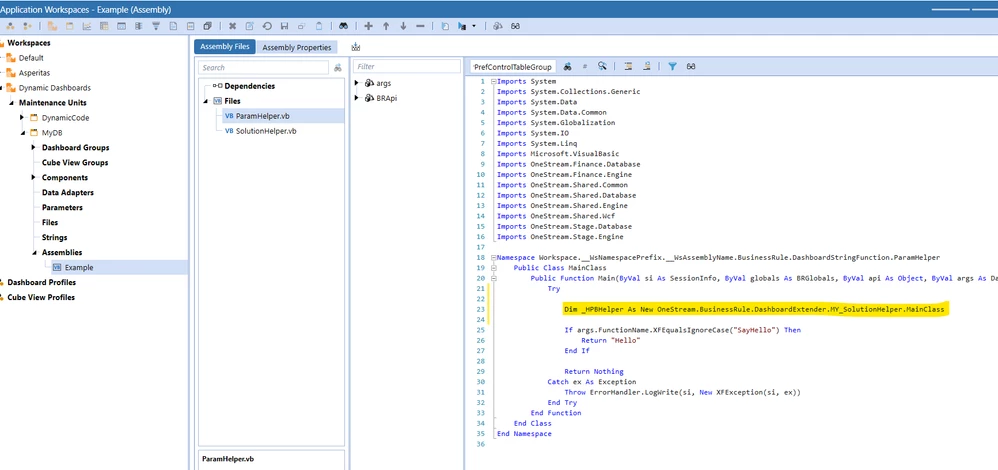
I'm trying to find out the correct way to reference a function in another Workspace assemblies file.

For example say i have:

1) XFBR business rule assembly file (ParamHelper.Vb)
2) Dashboard Extender business rule assembly file (SolutionHelper.Vb)

I want to call a function that is in SolutionHelper.vb  from my code that sits in ParamHelper.vb

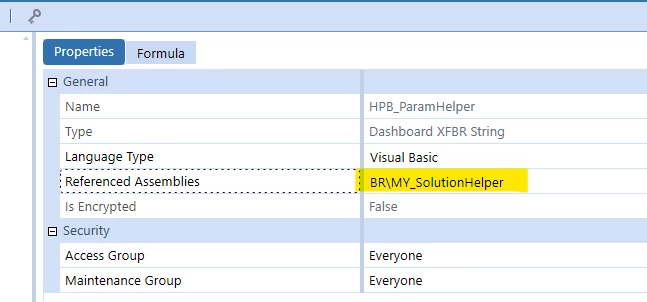
In standard business rules this was easily achieved using Referenced Assemblies in the business rule property 

Assemblies2.png

and then adding something along the lines of this below: 
Dim _MYHelper As New OneStream.BusinessRule.DashboardExtender.HPB_SolutionHelper.MainClass

Just not sure how the same is achieved using assemblies
Assemblies.png


Thank you

Best answer by ChristianW

In version 8, most of the business rules will be located in the same namespace

Namespace Workspace.__WsNamespacePrefix.__WsAssemblyName

So to access classes within this namespace, just add

Imports Workspace.__WsNamespacePrefix.__WsAssemblyName

to the business rules / files that are not in this namespace

For example:

...
Imports Workspace.__WsNamespacePrefix.__WsAssemblyName

Namespace Workspace.__WsNamespacePrefix.__WsAssemblyName.BusinessRule.DashboardExtender.SolutionHelper
	Public Class MainClass
...

This works as well in 7.4.x

So for all files, that are not of dashboard data set, dashboard extender, dashboard xfbr sting or Spreadsheet, business rules equivalent use this namespace.

3 replies

September 29, 2023

In version 8, most of the business rules will be located in the same namespace

Namespace Workspace.__WsNamespacePrefix.__WsAssemblyName

So to access classes within this namespace, just add

Imports Workspace.__WsNamespacePrefix.__WsAssemblyName

to the business rules / files that are not in this namespace

For example:

...
Imports Workspace.__WsNamespacePrefix.__WsAssemblyName

Namespace Workspace.__WsNamespacePrefix.__WsAssemblyName.BusinessRule.DashboardExtender.SolutionHelper
	Public Class MainClass
...

This works as well in 7.4.x

So for all files, that are not of dashboard data set, dashboard extender, dashboard xfbr sting or Spreadsheet, business rules equivalent use this namespace.

September 29, 2023

Excellent thank you Christian. Makes sense to me so i will give that a try

September 29, 2023

The OneStream.BusinessRule Namespace is not in scope in Referenced Assemblies.  To my knowledge, it won't work to reference standard business rules from a Dashboard Assembly.


RobbSalzmann_1-1696000763436.png


October 2, 2023

Thanks for commenting and although this wasnt what i was looking for i thought i would share with you as you may find it useful because It is actually possible to reference a business rule from a dashboard assembly.

1) Create a dependency with a BR type "Business Rule" and enter the name of the business rule


BR.png

2)  Create a new Object to the BR class in the assembly rule eg
Dim _HPBHelper As New OneStream.BusinessRule.DashboardExtender.HPB_SolutionHelper.MainClass

Note: Intellisense will not show it as being an option but it does still work


br2.png


October 2, 2023

This must be V8?  I don't see the choice to reference a BR in the 7.xx versions


RobbSalzmann_0-1696251396994.png


October 2, 2023

Thank you Christian and Jack. 
Seems very obvious now and really i just needed to get my head into thinking of this more as a project in visual studio with namespaces than regular business rules.