June 6, 2024
Solved

Workspace Assembly - Call functions from Finance or Connector business rules

  • June 6, 2024
  • 5 replies
  • 5 views

Hi Everyone, has anyone already tried to reference a Workspace Assembly business rule from a Finance or a Connector business rule?

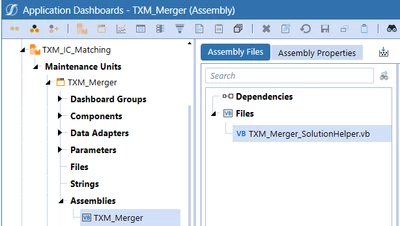
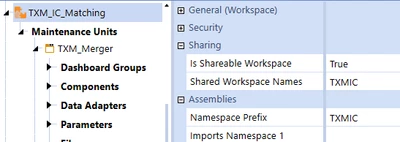
I have a business rule that is packaged to an Assembly in a Workspace:

alesage_0-1717678999084.png


alesage_0-1717678462245.png

It has a set of public functions returning dictionaries and other variables. And I would like these functions being called from a Connector.

I can successfully reference it from another Assembly workspace. But when I am using the same syntax in a connector, that is not working:
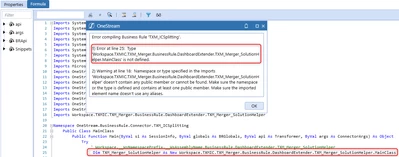
alesage_2-1717678514004.png


I am assuming the referenced Business rule must be declared in the Properties, but I am not sure of the syntax. Or even sure this is accepted.
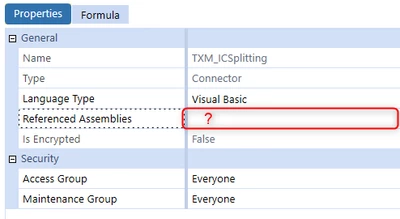

alesage_3-1717678534316.png

Many thanks to anyone who can helps!

Best answer by RobbSalzmann

Assemblies are referenced by importing the namespace 


Imports Workspace.__WsNamespacePrefix.__WsAssemblyName.DashboardExtender.TXM_Merger_SolutionHelper


Then to use it:

Dim merger_SolutionHelper as new TXM_Merger_SolutionHelper.MainClass

Also, don't use the implementation namespace (TXM_Merger_SolutionHelper) as a variable name.  It will cause issues.


5 replies

June 6, 2024

Hi, I think Daniel already figured this one out - quoting DanielWillis :

In your Referenced Assemblies you want to put: WS\Workspace.YourWorkspaceName.YourAssemblyName

Then in your rule you should be able to do something like these depending on your setup:

Dim yourClassName As New Workspace.YourWorkspaceName.YourAssemblyName.YourClassName

Dim yourClassName As Workspace.YourWorkspaceName.YourAssemblyName.BusinessRule.DashboardExtender.YourFileName.MainClass


Let us know if this works so that other members can leverage that as well!

June 6, 2024

Hi Henning, 

No, that is not working. I tried different options with the Namespace prefix or the workspace name, that doesn't work.
I tried different options, that I mentioned below. Unfortunately, none of them works so far... 

Thanks for your time and your help Henning. 


WS\Workspace.TXM_IC_Matching.TXM_Merger
WS\Workspaces.TXM_IC_Matching.TXM_Merger
WS\TXM_IC_Matching.TXM_Merger
BR\Workspace.TXM_IC_Matching.TXM_Merger
BR\Workspaces.TXM_IC_Matching.TXM_Merger  

WS\Workspace.TXM_IC_Matching.TXM_Merger\TXM_Merger_SolutionHelper
WS\Workspaces.TXM_IC_Matching.TXM_Merger\TXM_Merger_SolutionHelper
WS\TXM_IC_Matching.TXM_Merger\TXM_Merger_SolutionHelper
BR\Workspace.TXM_IC_Matching.TXM_Merger\TXM_Merger_SolutionHelper
BR\Workspaces.TXM_IC_Matching.TXM_Merger\TXM_Merger_SolutionHelper

June 6, 2024

Assemblies are referenced by importing the namespace 


Imports Workspace.__WsNamespacePrefix.__WsAssemblyName.DashboardExtender.TXM_Merger_SolutionHelper


Then to use it:

Dim merger_SolutionHelper as new TXM_Merger_SolutionHelper.MainClass

Also, don't use the implementation namespace (TXM_Merger_SolutionHelper) as a variable name.  It will cause issues.


June 6, 2024

Hi Rob, thank you for your answer.

 I have tried to add the following imports in my Connector business rule:

Imports Workspace.__WsNamespacePrefix.__WsAssemblyName.DashboardExtender.TXM_Merger_SolutionHelper
Imports Workspace.TXM_IC_Matching.TXM_Merger.DashboardExtender.TXM_Merger_SolutionHelper 
Imports Workspace.TXM_IC_Matching.TXM_Merger.BusinessRule.DashboardExtender.TXM_Merger_SolutionHelper.MainClass

This is providing Warnings, that doesn't seem to be recognized. 


alesage_0-1717685901801.png

Thank you for your time. 


June 6, 2024

The code is compiling and working.  The issue is none of your assembly seems to be public.  post the code and I can help.


RobbSalzmann_0-1717686188065.png


December 12, 2024

Hi Robb!

Hoping to get some guidance on how to accomplish the following. I am working with OneStream Financial Close PV840-SV100. 

We basically need to embed Dashboard 0000_Frame_RCM (sits under OFC Workspace) into a customized dashboard that sits under the Default Workspace. We have to execute OnLoadMainDashboard to set the many parameters required. I created a dependency but the code below is returns an error. Could you please shed some light into how to execute OnLoadMainDashboard(). Thank YoU!!!!!!!!


December 12, 2024

Hi Oscar 
A couple of things...

This is an old thread.  Please start a new one to get better visibility.
Your namespace statement should not end with a semicolon.


The classname is MainDashboard, so your instantiation should be more along the lines of:
Dim oPHelper as New Workspace.OFC.RCM.Dashboards.MainDashboard(si, args, "OnLoadMainDashboard")

Your MainDashboard class declaration is not correct. it should look more like:

internal class MainDashboard : DashboardEvent
{
    public MainDashboard(DashboardEventArgs eventArgs) : base(eventArgs)
    {
        // Constructor body
    }
}


I can't see the Workspace.OFC.RCM.Dashboards.MainDashboard class constructor in your screeshots so this is as close as i can get for now.  

Please start a new thread to continue.  

Thanks!

December 12, 2024

sorry about that ... here is the new thread https://community.onestreamsoftware.com/discussions/Marketplace/onestream-financial-close-pv840-sv100-assembly/41456