
LIM CSV Import Error Message
While importing data to the Register via CSV file, you encounter the following error message: “One or more required columns is missing data. Populate the file and reload”. This article covers tips for troubleshooting and resolving this error.
When loading data via a CSV file import, you may encounter the following error message:
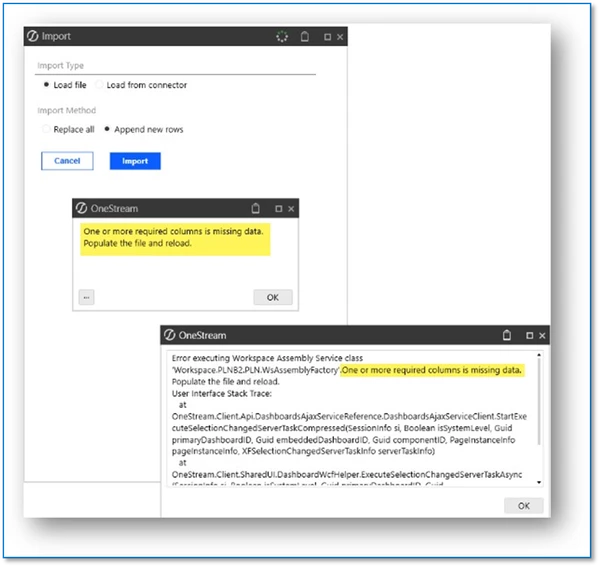
This error message can be a red herring or false error message. It may not be because you are missing any required data, but instead it is because you have commas in a field within the CSV file, e.g. a lot of times a Job Title field may have a comma, or number fields may have commas, etc.
Resolution
LIM only accepts CSV as a file type when choosing to load data via a file (rather than Spreadsheet or Direct Connect). When you have commas in register fields this will cause an error message to appear upon importing: “One or more required columns is missing data”.
Options to Resolve:
- Remove all commas from all fields (numbers, strings, etc.) before loading.
- Change your computer delimiter (1) to use a pipe or other delimiter which is a character that does not appear in any register fields.
- Use a OneStream Data Source. Set up your Import Step to Import (Stage Only). Then use the Direct Connector business rule (e.g., WorkforcePlanningImportRegisterConnector# (2), found in Application > Business Rules > Dashboard Extender).
(1) Changing Computer Delimiter - see also attachment instructions
(2) Business rule name may be different depending on the LIM selection and number of workspaces created.
Overall Recommendation
The solution you choose to employ is up to you, and your company needs.
References: refer to LIM: Example of a Simple Connector Setup from OneStream Stage, which is another technical guide, available on OneCommunity.
DISCLAIMER: It should be noted that the focus of this technical guide is to provide general information, considerations, and guidelines for an identified topic. It is NOT to be interpreted as the ONLY approach nor a guarantee that there will not be any issues encountered by using this approach as a customer’s requirements or application configuration may render this guidance as not applicable.
In addition, statements that “we believe” and similar statements reflect our beliefs and opinions on the relevant subject. These statements are based upon information available to us as of the date of this article, and while we believe such information forms a reasonable basis for such statements, such information may be limited or incomplete, and our statements should not be read to indicate that we have conducted an exhaustive inquiry into, or review of, all potentially available relevant information. OneStream does not warrant as to the accuracy of this guidance, which is provided on an as-is basis.
Any forward-looking statements contained herein are based on information available at the time those statements are made and/or good faith beliefs and assumptions as of that time with respect to future events and are subject to risks and uncertainties that could cause actual performance or results to differ materially from those expressed in or suggested by the forward-looking statements. Considering these risks and uncertainties, the forward-looking events and circumstances discussed in this guide may not occur and actual results could differ materially from those anticipated or implied in the forward-looking statements.