January 18, 2024
Solved

Any way to export imported source documents from OneStream to an External folder?

  • January 18, 2024
  • 2 replies
  • 0 views

hey All,

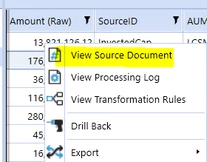
I have request to dump out all the imported source documents to a central location. Not sure if it is possible. Looking for some information on

  1. Where these files/documents are stored within OneStream
  2. is there a way to export these files using a BR

           
Ashok_0-1705612137061.png


Best answer by MarcusH

The source documents are held in the table StageArchivesInformation. I haven't downloaded the source files but I think you will need something like this (saves the source file to the user's temporary folder):

Dim profileKey As String = si.WorkflowClusterPk.ProfileKey.ToString
Dim scenarioKey As Integer = si.WorkflowClusterPk.ScenarioKey
Dim timeKey As Integer = si.WorkflowClusterPk.TimeKey

Dim sql As New Text.StringBuilder
sql.AppendLine("SELECT SourceFileName, SourceFileBytes")
sql.AppendLine("FROM StageArchivesInformation With(NOLOCK)")
sql.AppendLine(String.Format("WHERE Wfk = '{0}'", profileKey))
sql.AppendLine(String.Format("AND Wsk = {0}", scenarioKey))
sql.AppendLine(String.Format("AND Wtk = {0}", timeKey.ToString))

Dim SourceFileName As String = String.Empty 
Dim fileBytes As Byte() 
Using dbConnApp As DbConnInfo = BRApi.Database.CreateApplicationDbConnInfo(si)
    Using dt As DataTable = BRApi.Database.ExecuteSql(dbConnApp, sql.ToString, False)
        If (dt IsNot Nothing) AndAlso (dt.Rows.Count > 0) Then
            For Each dr As DataRow In dt.Rows
                SourceFileName = dr("SourceFileName")
                fileBytes = dr("SourceFileBytes")
            Next
        End If
    End Using
End Using

BRApi.Utilities.SaveFileBytesToUserTempFolder(si, si.UserName, SourceFileName, fileBytes)

 

2 replies

MarcusHAnswer
January 19, 2024

The source documents are held in the table StageArchivesInformation. I haven't downloaded the source files but I think you will need something like this (saves the source file to the user's temporary folder):

Dim profileKey As String = si.WorkflowClusterPk.ProfileKey.ToString
Dim scenarioKey As Integer = si.WorkflowClusterPk.ScenarioKey
Dim timeKey As Integer = si.WorkflowClusterPk.TimeKey

Dim sql As New Text.StringBuilder
sql.AppendLine("SELECT SourceFileName, SourceFileBytes")
sql.AppendLine("FROM StageArchivesInformation With(NOLOCK)")
sql.AppendLine(String.Format("WHERE Wfk = '{0}'", profileKey))
sql.AppendLine(String.Format("AND Wsk = {0}", scenarioKey))
sql.AppendLine(String.Format("AND Wtk = {0}", timeKey.ToString))

Dim SourceFileName As String = String.Empty 
Dim fileBytes As Byte() 
Using dbConnApp As DbConnInfo = BRApi.Database.CreateApplicationDbConnInfo(si)
    Using dt As DataTable = BRApi.Database.ExecuteSql(dbConnApp, sql.ToString, False)
        If (dt IsNot Nothing) AndAlso (dt.Rows.Count > 0) Then
            For Each dr As DataRow In dt.Rows
                SourceFileName = dr("SourceFileName")
                fileBytes = dr("SourceFileBytes")
            Next
        End If
    End Using
End Using

BRApi.Utilities.SaveFileBytesToUserTempFolder(si, si.UserName, SourceFileName, fileBytes)


February 9, 2024

Hello, I am running a code similar to this one, it seems like it's working fine. However, I don't see the file in the Temp folder ... do you happen to know in which temp folder the file is supposed to be saved ? An example of a path maybe ?

August 27, 2024

hi dear,  were u able to resolve this issue, even i am unable to find the temp folder on my local machine.

AshokAuthor
January 19, 2024

Thank you MarcusH . I will give it a try. Appreciate sharing the code.

January 15, 2025

Hello,

I found a Temp folder when I tested it.


But when I downloaded the file, for me it wasn't readable.

Good luck!

JC