To do this, there are two main steps
1) find a suitable dashboard report that replicates what you see in Intersection Validations
2) run it from a BR
For step (1): There is a report, bundled with the Standard Application Reports (downloadable from Marketplace) which shows invalid intersections (see below)
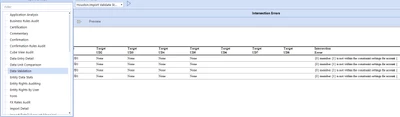
The trouble is with this report, is that it doesn't substitute the member names into the Intersection Error message column. So you get messages like this:
{0} member {1} is not within the constraint settings for account {2}
and even that gets chopped off on the Standard Application Reports.
This makes the report far less useful, and probably not good enough for this purpose. We'll come back to this in a moment.
For step (2) , how to run a PDF from a dashboard from a Business Rule, there are two options:
- BR runs a Data Mgmt step to export the dashboard report to a place in the FileShare, and then attach it through the email , or
- Use the brapi.Dashboards.Process.ExportReportsForMultipleDashboards) to generate the file bytes for a PDF report, save the file bytes as a PDF , and attach that to the email.
However, even by implementing step (2) there isn't a ready-to-use dashboard report that will correctly show the intersection errors and show you what members are involved.
To resolve the issues from Step 1, I would go for a simpler solution, and simply embed the intersection validation messages (with the member names) into the body of the email , as text or HTML.
The following Extender Rule will report the Intersection Validation messages for the current workflow/time/scenario.
The other notable feature of this example (unlike any dashboard report) is that it will correctly substitute the correct member names into the Validation Error Message, by using a DataCellValidationMsgList class.
Make sure your workflow is on the import step when running this example in isolation, and this sample code must be created as an Extender rule.
Imports System
Imports System.Collections.Generic
Imports System.Data
Imports System.Data.Common
Imports System.Globalization
Imports System.IO
Imports System.Linq
Imports System.Windows.Forms
Imports Microsoft.VisualBasic
Imports OneStream.Finance.Database
Imports OneStream.Finance.Engine
Imports OneStream.Shared.Common
Imports OneStream.Shared.Database
Imports OneStream.Shared.Engine
Imports OneStream.Shared.Wcf
Imports OneStream.Stage.Database
Imports OneStream.Stage.Engine

Namespace OneStream.BusinessRule.Extender.ValidationReport
	Public Class MainClass
		Public Function Main(ByVal si As SessionInfo, ByVal globals As BRGlobals, ByVal api As Object, ByVal args As ExtenderArgs) As Object
			Try
				If args.FunctionType = ExtenderFunctionType.Unknown

					Dim gWFid 		As Guid    = si.WorkflowClusterPk.ProfileKey
					Dim idScenario 	As Integer = si.WorkflowClusterPk.ScenarioKey
					Dim idTime 		As Integer = si.WorkflowClusterPk.TimeKey

					Using dbConnApp As DbConnInfoApp = BRApi.Database.CreateApplicationDbConnInfo(si)
						Dim strSQL As String = "SELECT * FROM StageToFinanceValidationError WHERE WorkflowProfileKey=@wfk AND WorkflowScenarioKey=@wsk AND WorkflowTimeKey=@wtk"
						Dim lstParamInfo As New List(Of DbParamInfo)
						lstParamInfo.Add( New DbParamInfo("wfk", gWFid))
						lstParamInfo.Add( New DbParamInfo("wsk", idScenario))
						lstParamInfo.Add( New DbParamInfo("wtk", idTime))

						Using dtValErr As DataTable = brapi.Database.ExecuteSql(dbConnApp, strSQL, lstParamInfo, False)
							Dim sb_ValErrorsReport As New Text.StringBuilder()
							For Each drVal As DataRow In dtValErr.Rows
								Dim strValMsg = drVal("ValidationmessagesXml").ToString()
								Dim validationMsgList As DataCellValidationMsgList = XmlObject.ReadXmlString(si, GetType(DataCEllValidationMsgList), strValMsg, True)
								For Each err As DataCellValidationMsg In validationMsgList.Messages
									sb_ValErrorsReport.AppendLine( String.Format(err.ErrorMsg,err.StringParams) )
								Next
							Next
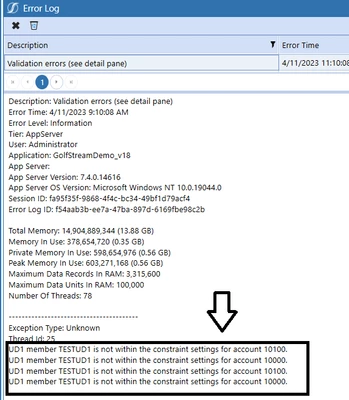
							brapi.ErrorLog.LogMessage(si, "Validation errors (see detail pane)", sb_ValErrorsReport.ToString() )

						End Using

					End Using
					brapi.Dashboards.Process.ExportReportsForMultipleDashboards
				End If

				Return Nothing
			Catch ex As Exception
				Throw ErrorHandler.LogWrite(si, New XFException(si, ex))
			End Try
		End Function
	End Class
End Namespace
Output: