
March 14, 2022

Clear data from Workflow import

  • March 14, 2022
  • 10 replies
  • 1 view

Hey everyone - 


How do I clear data from these workflow manual imports automatically?

Right now, I've been going through each month one by one. Wondering if there is a BR that can run them all together and clear up data from those specific imports and time dimension. 

Here are the steps I want to follow: 

Navigate to import that needs to be cleared > Clear > Re-Transform > Validate > Load Cube
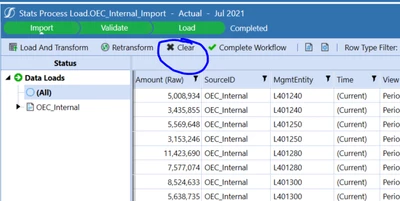
 

Mustafa_A_0-1647296323090.png


10 replies

March 15, 2022

You can create an Extender rule that mimics a load using the following.

Dim impProcessInfo As LoadTransformProcessInfo = BRApi.Import.Process.ExecuteParseAndTransform(si, wfCurrentClusterPk, "filename or dm name", Nothing, TransformLoadMethodTypes.Replace, SourceDataOriginTypes.FromFileUpload, True)

  You can change the loadmethodtypes to do replaces. I've not tried that with a blank file though.

March 16, 2022

Hi ckattookaran 

I'm not intending to load a blank file. I want the WF to "Clear" data by itself, and run the validation-load steps period by period. 

Mustafa_A_0-1647459057915.png

Last night,  I figured out a different solution and it works. It's mainly defining the workflow (using as WFUnitClusterPk) and using brapi.import.process to execute the various steps (Clear Data, Retransform, Validate, Load).


March 16, 2022

Your question was how can I clear the data from workflow profiles, not how can I automate the load process!

Are you saying that there is a method in brapi.import.process to clear the data alone?

April 6, 2022

Did you try using the Workflow Batch Multi Period Processing screen?  

TonyToniTone_0-1649274150545.png


April 6, 2022

Oh. I didn't see this before. Very useful to know!!