
July 23, 2024

Data Import decimal places

  • July 23, 2024
  • 1 reply
  • 0 views

Hello everyone,

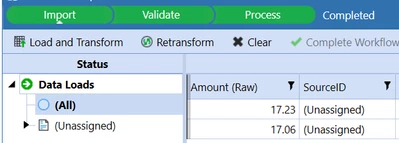
Is there a way to import data in such a way that we have more than 2 decimal places in the import step? 

Belmontes_0-1721766657872.png

Our .csv files have 4 decimal places and OS is rounding those amounts to 2 decimal places. We would like to keep that level of detail

Thanks in advance

1 reply

July 24, 2024

Hi, the data you see in stage is only the displayed data. If you look at the stored data, you will see up to nine digits. You can check e.g. the cell status in a cube view:


Henning_0-1721806199185.png

You can set the number format in your cube view to see all four digits as well:


Henning_3-1721806588481.png


Henning_2-1721806565166.png

Or you can e.g. query the stable view [vStageSourceAndTargetData] to see the decimals.


Henning_1-1721806321851.png

Regardless of the displayed data, the system will always use the stored data that includes your 4 digits after the decimal point (provided no one uses a rounding function, which should never be used outside of reporting).


July 25, 2024

In addition, the number of digits displayed on the Import screen is controlled by the Number Format field of Application Properties. You can change the format so you can see additional digits, but, of course, the change will be applied to the entire application.