June 25, 2024
Solved

DataSource with Data Export Sequence in a workspace - Name not accepted

  • June 25, 2024
  • 1 reply
  • 0 views

Dear community members,

I have a DM Export Sequence defined in a workspace.  However, i am not able to save the data source after assigning the DM sequence to the Data Mgmt Settings:Data Export Sequence. 
While i am able to select the sequence,
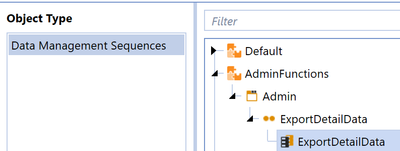

wnindl_2-1719343299850.png

when i try to save 


wnindl_3-1719343337321.png

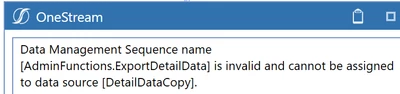
i get this error message: 


wnindl_4-1719343370606.png

And while the new workspaces are awesome i dont seem to be able to correctly interpret this helpful note in the design & Reference Guide. 
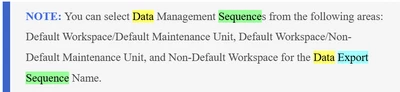

wnindl_1-1719343158271.png

If OneStream lets me select my DM sequence, does that mean that my DM sequence follows these rules? I have a Non-Default Workspace and a DM Sequence Name. But alas ....

We are on 8.2.2.  Any tips or references to a solution that may already be here on community would be much appreciated.
 

Best answer by Henning

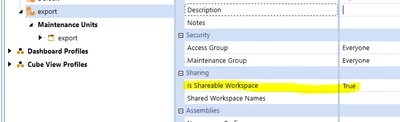
Hi, you need to set Shareable Workspace to True, then it should work:


Henning_0-1719384004639.png

Without this, the items in a workspace can only be references from within a given workspace.

I am on 8.1 and I get the same error message when this is set to False. The Default workspace works as per your description because this is set to True in order to ensure all previous content is working as intended ('backward compatibility').

Adding the property description from the documentation for general reference: Workspaces Properties (onestream.com)

1 reply

WernerNAuthor
June 25, 2024

To update:
I gave up my plan of using a dedicated workspace, moved the maintenance unit into Default and i was able to associate the data source with the DM sequence. 

HenningAnswer
June 26, 2024

Hi, you need to set Shareable Workspace to True, then it should work:


Henning_0-1719384004639.png

Without this, the items in a workspace can only be references from within a given workspace.

I am on 8.1 and I get the same error message when this is set to False. The Default workspace works as per your description because this is set to True in order to ensure all previous content is working as intended ('backward compatibility').

Adding the property description from the documentation for general reference: Workspaces Properties (onestream.com)

WernerNAuthor
June 28, 2024

OF course. Thank you so much. I keep forgetting this setting.