July 22, 2025
Solved

Decrypting files in integration

  • July 22, 2025
  • 3 replies
  • 0 views

Hi All,

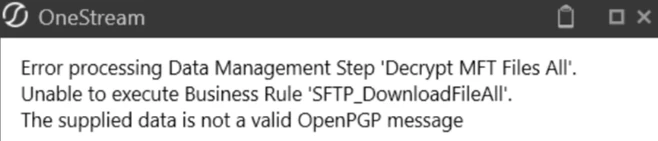
There are two files. I can decrypt one file but unable to decrypt the second file during the integration stage, getting this error:


Session details have been confirmed. No changes there.

Any thoughts how I can troubleshoot this?

Best answer by RobbSalzmann

The way to troubleshoot this is to first make sure the message in the file you say is encrypted can be decrypted with the supplied key by manually decrypting it.  You can do this online: https://8gwifi.org/pgpencdec.jsp

Next, make sure you're using the correct keys.  You say there's two different files to decrypt.  Ensure that the key used to decrypt the second file is the right key (e.g. make sure you're not reusing the key from the first file.).

Write your decryption code in logical steps and write to the log the status of each step - this is because OneStream doesn't provide a debugger for its code.

3 replies

July 22, 2025

How are you trying to decrypt the file? It looks like it is PGP-encrypted, so do you have a local PGP-compatible/aware BR to handle this?

jaideepkAuthor
July 22, 2025

Yes, have the BR which is working for 1 PGP encrypted file but not for the other file. Both the files are of same type. Connection details are also the same.

July 22, 2025

Are you using the SCP libraries for SFTP? Given that this looks to be a PGP error, can you decrypt the file successfully outside of OneStream to check that it's not corrupted?

Also, given that MFT looks to be a Managed FTP solution, are you sure that the file isn't being transmitted as Binary instead of ASCII (or vice versa), and so getting corrupted?

Is a different key used for each file? Does the key have to be coded/decoded (e.g. BASE64)?

July 22, 2025

The way to troubleshoot this is to first make sure the message in the file you say is encrypted can be decrypted with the supplied key by manually decrypting it.  You can do this online: https://8gwifi.org/pgpencdec.jsp

Next, make sure you're using the correct keys.  You say there's two different files to decrypt.  Ensure that the key used to decrypt the second file is the right key (e.g. make sure you're not reusing the key from the first file.).

Write your decryption code in logical steps and write to the log the status of each step - this is because OneStream doesn't provide a debugger for its code.

jaideepkAuthor
July 27, 2025

Thank you all for the help. 

SteveK​ - Thanks for pointing to attempt decrypting the file outside of OneStream. It helped. I used Kleopatra to decrypt the file locally.

RobbSalzmann​ - Thanks for the inputs. Used the error log to identify where the code was getting stuck.