
October 24, 2024
Solved

Error when accessing the Workflow Import step

  • October 24, 2024
  • 3 replies
  • 1 view

Hi Everyone, 

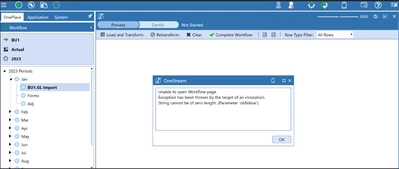
I was recently working within a Demo Environment where I suddenly started getting error message when trying to access the import step in the Load and Transform (Import) step in the Import Workflow. 

Hamza_0-1729769539805.png


The Error above pops up every time anyone tries to access the Load and Transform (Import) step. 

Have anyone seen this issue before and knows how to fix it? 

NOTE: This issue is the same across all applications in this environment.  

Thanks, 

Hamza


Best answer by yhussien

The cause of the issue was identified to be that the 'FileShareRootFolder' in the configuration was blank. 

Check under System -> Environment -> <server name> -> Configuration -> FileShareRootFolder.

If it is blank you need to create a file share folder (e.g. D:\Onestream\Fileshare) on the application server and update your Application Config file to point to the new folder. Then restart the application.


3 replies

October 25, 2024

Hi Hamza, You may be best to also raise a case with OS support for an error like this. Has the issue resolved itself since you original post?

HamzaAuthor
October 28, 2024

Thank you Karl, 

The issue is still there unfortunately and I have never seen anything similar before. 

Have you seen this issue before? I will have to raise a ticket with OneStream 

Thanks

August 25, 2025

Hello Hamza,

Did you figure out the issue? We are running into the same thing.

Thanks

yhussienAnswer
August 27, 2025

The cause of the issue was identified to be that the 'FileShareRootFolder' in the configuration was blank. 

Check under System -> Environment -> <server name> -> Configuration -> FileShareRootFolder.

If it is blank you need to create a file share folder (e.g. D:\Onestream\Fileshare) on the application server and update your Application Config file to point to the new folder. Then restart the application.