
April 4, 2023
Solved

FileExplorer - error when accessing FileShare

  • April 4, 2023
  • 2 replies
  • 1 view

Hello,

I am getting this error when trying to access FileShare under FileExplorer:


The path is not of a legal form.

.
Source code: WcfRetryManager.cs, line 299, method ExecuteRetries.
.
Source code: WcfRetryManager.cs, line 369, method ExecuteRetriesStartingWithPreferredAppServerIndex.
.
Source code: WcfRetryManager.cs, line 497, method TryExecuteAction.
.
Source code: FileSystemWcf.cs, line 198, method EnumFoldersInFolder.
.
Source code: FileSystemWcf.cs, line 853, method GetFolder.
.
Source code: FileSystemOS.cs, line 185, method GetFolder.
The path is not of a legal form.
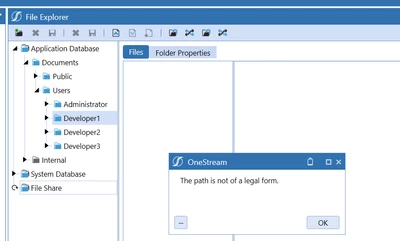

oanamihai_0-1680615339768.png


Has anyone encountered this error previously? To me it seems like an application error but I am not sure where I can check further. Thank you.

Best answer by JackLacava

Yes. No root file share, no file share 🙂 Unlike Application and System databases, which are virtual (contents are stored in db tables), the File Share is a physical filesystem on the server; so you have to tell Onestream where to look for it, with that property. I'd suggest to edit that file with the Server Configuration Utility though.

2 replies

oanamihaiAuthor
April 4, 2023

In the config file of the app there is nothing set for the property: FileRootShareFolder, could this be the source of the error?


oanamihai_0-1680616019176.png


April 6, 2023

Yes. No root file share, no file share 🙂 Unlike Application and System databases, which are virtual (contents are stored in db tables), the File Share is a physical filesystem on the server; so you have to tell Onestream where to look for it, with that property. I'd suggest to edit that file with the Server Configuration Utility though.

oanamihaiAuthor
April 6, 2023

Thank you for your reply, JackLacava . I did this change directly in the config file and I got rid of the error. I will use the Configuration Utility in the future 🙂