
April 8, 2024
Solved

Green cells not turning to white on Cube View

  • April 8, 2024
  • 1 reply
  • 0 views

Good Day 

I would like to know what could I possible check to ensure that a green cell turns to white so users can input data. I have checked the Accounts dimension on the row as well as the override dimension and the allowed input has been set to true. Further to that I have checked the UD dimensions on that cell and those are set to true as well. I have checked on the cube view and the modify data is set to true as well. Is there some other place I could see to resolve the issue?


Regards

Rehaan
Best answer by RehaanAbdulla

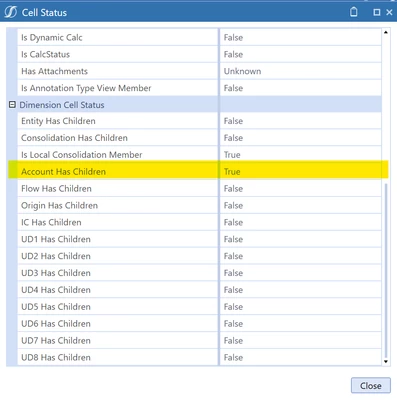
Thank you for that tip. It has helped. My issue that the member they wanted input is a parent member and checking Dimension Cell Status Grid, you need to look at and see if the Account has Children, needs to be false in my case was true


RehaanAbdulla_0-1712583288044.png


1 reply

April 8, 2024

I have found that the Dimension Cell Status grid is very useful for help in identifying where the problem is. On the Cube View right click a cell and select Cell Status. Check the General Cell Status at the top to make sure it's not a security problem. Then review the lower Dimension Cell Status grid. This is an example of an input cell:


MarcusH_0-1712580401716.png


RehaanAbdullaAuthorAnswer
April 8, 2024

Thank you for that tip. It has helped. My issue that the member they wanted input is a parent member and checking Dimension Cell Status Grid, you need to look at and see if the Account has Children, needs to be false in my case was true


RehaanAbdulla_0-1712583288044.png