
April 8, 2024
Solved

How to add base member accounts in a member filter in a cube view

  • April 8, 2024
  • 2 replies
  • 0 views

Hi 

I need to add two base member accounts in the member filter of a cube view. Would this be the correct syntax: A#Account1, A#Account2. Or do you need to add a plus sign between them?
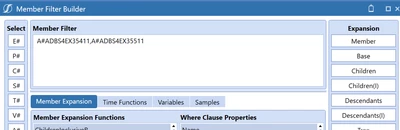

RehaanAbdulla_0-1712585576263.png

Regards


Best answer by jwagner

Are you trying to sum up the two members or just have them both display in the cv?  
If you are trying to add them together: GetDataCell(A#Account1 + A#Account2)

For Display Purposes:  A#Account1, A#Account2

2 replies

April 8, 2024

Yes, this is correct.,  It looks like this in the report:


RobbSalzmann_1-1712590827362.png


jwagnerAnswer
April 9, 2024

Are you trying to sum up the two members or just have them both display in the cv?  
If you are trying to add them together: GetDataCell(A#Account1 + A#Account2)

For Display Purposes:  A#Account1, A#Account2

April 10, 2024

I was looking for display purposes but thank you for showing the way to add them up as well