
January 23, 2024

How to remove " Deprecated " Option from my workflow profile?
  • January 23, 2024
  • 2 replies
  • 0 views


rchaturvedi27_0-1706011483373.png

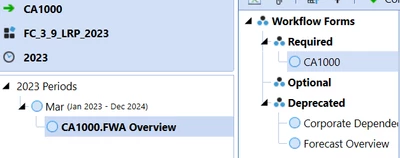
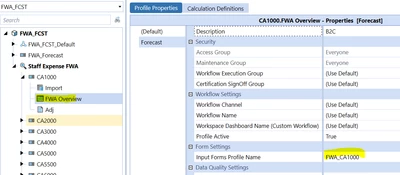
I would like to see just the current form profile and related cubeview to be seen as "Required" option. I dont want to see this "Deprecated" options. Does anyone know how to change this? I couldn't find an option in the workflow profile. 

rchaturvedi27_1-1706011629047.png


2 replies

January 23, 2024

Hi rchaturvedi27 , 
As of my knowledge we don't have any options to hide/delete the deprecated option from the workflow profile.
You can also post this enhancement request in IdeaStream

This community post might help you to understand better. 
https://community.onestreamsoftware.com/t5/Implementation-Q-A-Archive/Is-there-a-way-to-delete-deprecated-workflows/ta-p/1505

Thanks, 🙂 
Nitish Krishna B - LinkedIn - Nitish Krishna B
Donyati India Private Limited


January 23, 2024

Thanks for the information. This is the first time I am seeing this. Is there a way to hide it from other users - and only make it visible to the administrator maybe?

January 23, 2024
  1. Create a new Forms Profile that contains only the Form you need
  2. Create a new Workflow Profile (e.g. CA1000v2), assign the new Input Form Profile to it, and enable it.
  3. Move the old workflow profile out of the way, under an admin-only parent like "donotuse".
    JackLacava_0-1706015210741.png


January 24, 2024

Alternatively, if you do not want to create a new Workflow profile and do not have any data in that workflow profile (for that scenario/Time profile). You could explore creating a 'Reset Scenario' step (under Data Management) which is something I had to use as I could not create a new WF profile but was able to reset ahead of submissions for the time period.

Any Workflow progress/data will be removed so proceed with caution when using this option.


NaeemPathan_0-1706095320344.png