
January 14, 2026
Solved

Import .CSV data source with 2 matrix

  • January 14, 2026
  • 2 replies
  • 3 views

Hi.
I have a .csv file that i am importing as a Matrix. I have 4 columns that each has different UD6 member. Problem is, one of the columns also have a different Account than the other 3.

Can I somehow do a double matrix, or pull the data from the one column in another way. 

I would like to see if I can avoid loading the file multiple times or manipulate it otherwise before load.

Appreciate any suggestions :) 

Details: 
Column1: U6#TECH1:A#0210
Column2: U6#TECH2:A#0210
Column3: U6#TECH3:A#0210
Column4 :U6#UnallocTech:A#0205
 

Best answer by josrisager

Thank you for your suggestion, Marcus. I could unfortunately not get it to work. 

I ended up finding another solution, posting it here in case someone else could draw inspiration :)
 
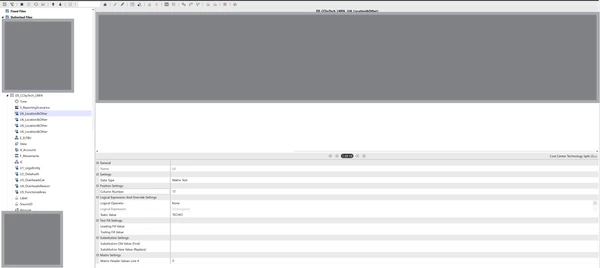
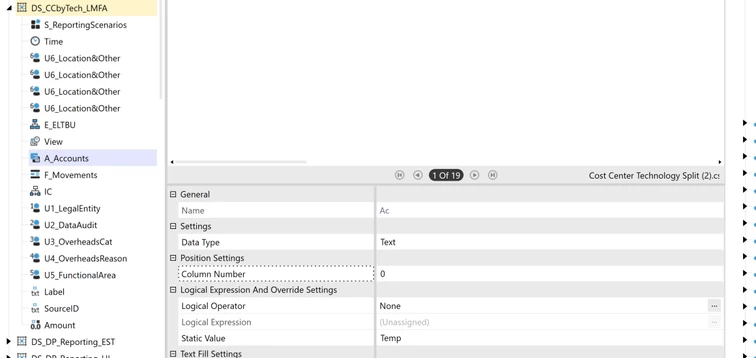
Setting the Account to a Temp static value in my data source.


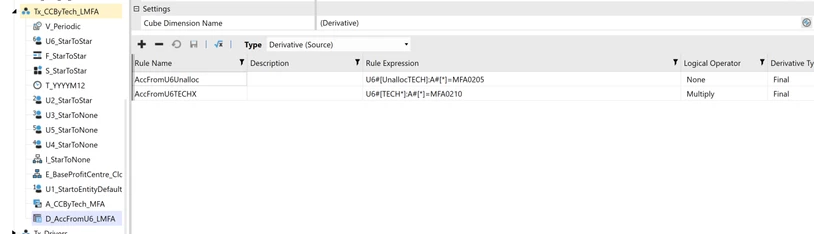
Using a derivative transformation rule to map the UD6 members to the correct account. 


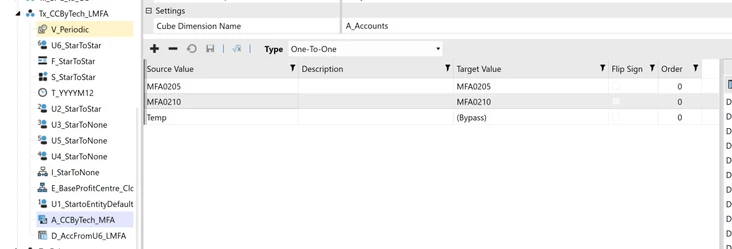
Ending with Bypassing the Temp account in my Account Transformation rule. 


Thanks Again for your time!

2 replies

January 14, 2026

Can you post a screenshot of the source CSV or some sample rows.

January 15, 2026

Of course!

The U6/account combination is: 
Column L: U6#UnallocTech:A#0205
Column Q: U6#Tech1:A#0210
Column R: U6#Tech2:A#0210
Column S: U6#Tech1:A#0210


January 15, 2026

I think the only way you will be able to do this is to add a Business Rule to all of the UD6 columns on the Data Source. You add a value to Globals to identify the column number and then use a BR in the transformation rule for the account to look up the column number. The GolfStream application has examples of saving and retrieving values from Globals  (XFR_Delimited_Get_Amount and XFR_Delimited_Put_Entity).

In brief the code for the first UD6 column will be something like this:

globals.SetStringValue("UD6Instance", "0205")

and the others will be:

globals.SetStringValue("UD6Instance", "0210")

Then in the BR for the Account Transformation Rule you do something like this:

Return globals.GetStringValue("UD6Instance") 

Check the Transformation Sequence order on the cube (Cubes | cube | Integration tab). The UD6 dimension must be processed before the Account dimension.

josrisagerAuthorAnswer
January 22, 2026

Thank you for your suggestion, Marcus. I could unfortunately not get it to work. 

I ended up finding another solution, posting it here in case someone else could draw inspiration :)
 
Setting the Account to a Temp static value in my data source.


Using a derivative transformation rule to map the UD6 members to the correct account. 


Ending with Bypassing the Temp account in my Account Transformation rule. 


Thanks Again for your time!