
June 19, 2025
Solved

Journal creation through Excel Addin

  • June 19, 2025
  • 5 replies
  • 4 views

Hi everyone, 

I need to create a few journal templates so that they can be filled up in Excel and subsequently loaded into Onestream. I found online screenshots of some journal templates in Excel like the following one:
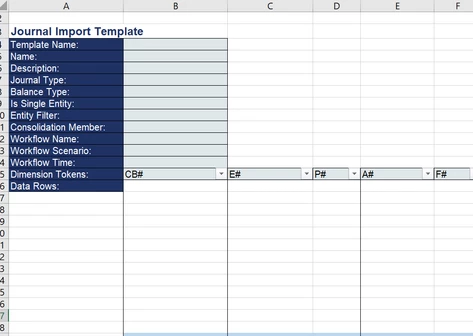


but it's not clear to me how can I create it. Is there a way to export in Excel the already precompiled structure of a journal from Onestream? or do I need to create it manually in Excel?

Any suggestion would help!

Best answer by JakeSteinberg

Hello,

The typical process is to create the journal template within the OneStream application. You would then insert the corresponding template name into your Excel form as well as the other necessary inputs. You can then manually manipulate your Excel journal workbook to match the columns in your template (just make sure your xfj Named Range is still intact after manipulation). You then import the Excel journal into OS using this button:


5 replies

June 19, 2025

Hello,

The typical process is to create the journal template within the OneStream application. You would then insert the corresponding template name into your Excel form as well as the other necessary inputs. You can then manually manipulate your Excel journal workbook to match the columns in your template (just make sure your xfj Named Range is still intact after manipulation). You then import the Excel journal into OS using this button:


June 23, 2025

An example has been sent directly to you. I did not find a solution to uploaded it here.

June 23, 2025

Hi

I have made this setup


It is important to have a defined name starting xfj_journal. If you have postings on more worksheets then set up more names e.g. xfj_journal1, xfj_journal2 etc.


For the user I think it is an advantage to use conditional formatting to change the (in this case) green area depending on the month. Most common error when reusing the spreadsheet is to forget to change month number.


fc5Author
June 27, 2025

Thank you both for the support!

June 27, 2025

Hi, adding this also for the wider audience, a journal import template is also available via the SolutionExchange, including the necessary XFJ range:


Just download the "Sample Templates"...


...and then open the Journal Template file which is in the WorkflowImportTemplate zip folder: