
January 6, 2025
Solved

Reference External DB and Application DB in one SQL Query

  • January 6, 2025
  • 4 replies
  • 0 views

Hello,

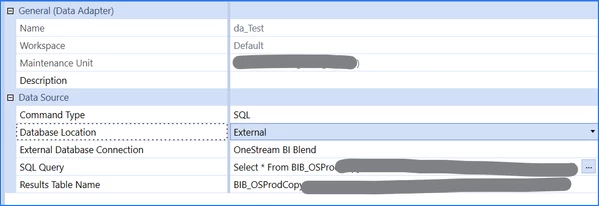
I am writing a SQL Query that references tables in different databases, one that exists in the External database (BI Blend) and one that exists in the Application database. I am having trouble setting up my data adapter to allow for pulling in both tables to perform a Union, as I need to specify the Database Location. Is this possible?


Best answer by sameburn

Hi danszczepanski

As Teresa and Daniel have pointed out. You can achieve this with a Dashboard DataSet BR.

You would need to execute both sql commands separately e.g datatable1 is from application database and datatable2 is from framework database

You can then use the DataTable Merge method (assuming both datatables have the same columns as per your union statement) to merge the two datatables.

Then return the merged DataTable to your Data Adapter. 

https://learn.microsoft.com/en-us/dotnet/api/system.data.datatable.merge?view=net-9.0&redirectedfrom=MSDN#overloads

Hope this helps

4 replies

January 6, 2025

My understanding is that it is an Azure limitation that you cannot SQL across two different databases.  If your customer or you are on the Azure Cloud, then no this will not be possible in a data adaptor.  There are work arounds via BRs that open two database connections and then run each SQL separately and joins via BR, but not data adaptor.

January 7, 2025

Thanks, T_Kress !

Employee
January 6, 2025

Hi danszczepanski 

As T_Kress mentioned the way to do this is by utilising a Business Rule. You will need to change the Data Adapter to Command Type: Method, Method Type: Business Rule instead of SQL. Can't remember if it gives an example of the method query syntax there but if not it should be in the docs and forums.

Your business rule will be a Dashboard Data Set business rule which returns a datatable (or is it a DataSet? You can query each database separately into data tables and then join them into a single datatable using .NET commands.

I think you should be able to search forums and the web for how to achieve the various bits and pieces from above. The docs might have some examples particularly around the method queries.

Regards,

Daniel

January 7, 2025

Thanks, Daniel! This was the route I began to go with. I will follow up if I have any further questions.

sameburnAnswer
January 7, 2025

Hi danszczepanski

As Teresa and Daniel have pointed out. You can achieve this with a Dashboard DataSet BR.

You would need to execute both sql commands separately e.g datatable1 is from application database and datatable2 is from framework database

You can then use the DataTable Merge method (assuming both datatables have the same columns as per your union statement) to merge the two datatables.

Then return the merged DataTable to your Data Adapter. 

https://learn.microsoft.com/en-us/dotnet/api/system.data.datatable.merge?view=net-9.0&redirectedfrom=MSDN#overloads

Hope this helps

January 7, 2025

Thank you, sameburn!

January 7, 2025

JackLacava  wrote a good article on how to do something similar with a Dashboard dataset BR.

The Dutiful Dead, or: A Tale Of Mixed DataSets | OneStream Community

January 7, 2025

Ah, JackLacava with another wonderful article. Thank you!