
November 20, 2023
Solved

Retrieve User behind completion of a workflow step (Forms & Journals) ?

  • November 20, 2023
  • 3 replies
  • 0 views

Hello,

Is it possible to get the user who completed a 'Form Input' step in OneStream ? 
To clarify, I am able to do so for 'Import/Validate/Load' steps but I'm under the impression that it's impossible for Forms or Journals. Anyone with a similar experience ? 

Thanks

Here goes my desperate attempt:

Dim wfstatus As WorkflowInfo = BRApi.Workflow.Status.GetWorkflowStatus(si, mywfstep)
Dim logusername as String = wfstatus.LastExecutedStep.StepLogItems(0).UserName 

' (wfstatus.LastExecutedStep.StepLogItems is Nothing) = True


Best answer by JackLacava

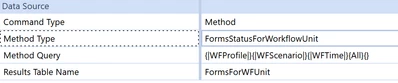
There is a DataAdapter method that will give you that information, so you can execute that (from a rule if necessary).


JackLacava_0-1700831184105.png

As far as I can see (but I've not tested it), the public API allows you to retrieve the forms with BRApi.Forms.Metadata.GetForms(si, wfClusterPk) , which should reflect form status, but it doesn't report the author. You could get the form ID from there and then look up some database table to get the user, but I reckon it's easier to just leverage the adapter.

3 replies

November 24, 2023

There is a DataAdapter method that will give you that information, so you can execute that (from a rule if necessary).


JackLacava_0-1700831184105.png

As far as I can see (but I've not tested it), the public API allows you to retrieve the forms with BRApi.Forms.Metadata.GetForms(si, wfClusterPk) , which should reflect form status, but it doesn't report the author. You could get the form ID from there and then look up some database table to get the user, but I reckon it's easier to just leverage the adapter.

November 24, 2023

Thanks for replying, I've been impatiently waiting 

I tried the method above, but weirdly I get an Empty DataTable (I am 200% there are no typos in my query). In database tables, I found the place where Forms are supposed to be logged but even there I can't see any form (There are at least 30 Forms in the app with 'Profile Active' set to true).


jacka3.png

What might be the root cause of this ?

November 24, 2023

Update: The requirement Level of the Form needs to be set as 'Required' for it to be seen in the DataBase ! 
Even though we cannot see audit details for 'Optional' Forms, the above does the job. Thanks Jack


December 14, 2023

Hi,

How did you get the Username for the step? I couldn't figure the function. Sorry, I think I am almost there but not there

December 15, 2023

Hello there, 

I used an SQL query to retrieve the infos I needed (completedUserName, RevertedUserName, StepStatus etc ...) but only if the form step has been initiated ! 

Here is a code sample:

Dim wfClusterPk As WorkflowUnitClusterPk = BRApi.Workflow.General.GetUserWorkflowInitInfo(si).GetSelectedWorkflowUnitClusterPk()

Dim baseWfProfileInfo As List(Of WorkflowProfileInfo) = BRApi.Workflow.Metadata.GetRelatives(si, wfClusterPk, WorkflowProfileRelativeTypes.Descendants, WorkflowProfileTypes.AllProfiles)											
If baseWfProfileInfo.Count > 0 Then
    For Each wfstep As WorkflowProfileInfo In baseWfProfileInfo										
	If wfstep.GetAttribute(myscenarioType.Id, 1300).GetValueAsInt(True) = 1 Then
            Dim tempsql As New Text.StringBuilder												 
            Dim tempdt = New DataTable("dataTableResult")												 
            tempsql.AppendLine("SELECT *")											 
            tempsql.AppendLine("FROM TaskflowStepLog")											 
            tempsql.AppendLine("WHERE TaskflowStepLog.Reason = 'InputForms'")												 
            tempsql.AppendLine("AND   TaskflowStepLog.Wfk = '" & wfstep.ProfileKey.ToString & "'")											 
            tempsql.AppendLine("AND   TaskflowStepLog.Wsk = '" & wfPk.ScenarioKey.ToString & "'")											 
             tempsql.AppendLine("AND   TaskflowStepLog.Wtk = '" & wfPk.TimeKey.ToString & "'")											 
             tempsql.AppendLine("ORDER BY TaskflowStepLog.InstanceTimeStamp Desc")
											
											 
             Using dbConnApp As DBConnInfoApp = BRAPi.Database.CreateApplicationDbConnInfo(si)
                 tempdt = BRApi.Database.ExecuteSql(dbConnApp, tempsql.ToString, False)											 
             End Using									
											 
             Dim lastCompleteFormUserName As String = "To Be Determined"											 
             Dim lastRevertFormUserName As String = "To Be Determined"											 
             Dim lastCompleteTime As Date = Date.MinValue											 
             Dim lastRevertTime As Date = Date.MinValue										 
             If tempdt.Rows.Count > 0 Then											 
             Dim CompleteuserID As Guid = tempdt.AsEnumerable().Where(Function(x) x("InstanceStatus") = 2).Select(Function(x) x("UserID")).FirstOrDefault()												 
             Dim lastCompleteSecurityUser As UserInfo = BRApi.Security.Authorization.GetUser(si, CompleteuserID)	
												 
             Dim RevertuserID As Guid = tempdt.AsEnumerable().Where(Function(x) x("InstanceStatus") = 1).Select(Function(x) x("UserID")).FirstOrDefault()												 
             Dim lastRevertSecurityUser As UserInfo = BRApi.Security.Authorization.GetUser(si, RevertuserID)											
												 
             If Not lastCompleteSecurityUser Is Nothing Then
													 
                  lastCompleteFormUserName = lastCompleteSecurityUser.User.Name													 
                  lastCompleteTime = tempdt.AsEnumerable().Where(Function(x) x("InstanceStatus") = 2).Select(Function(x) x("InstanceTimeStamp")).FirstOrDefault()
												 
              End If		
												 
              If Not lastRevertSecurityUser Is Nothing Then													 
                   lastRevertFormUserName = lastRevertSecurityUser.User.Name													 
                   lastRevertTime = tempdt.AsEnumerable().Where(Function(x) x("InstanceStatus") = 1).Select(Function(x) x("InstanceTimeStamp")).FirstOrDefault()												 
               End If
           End If
      Next wfstep
End If
												

From these infos you can create your own DataTable like the following:


ResultWFStats.png

Lemme know if this did the trick for you

December 15, 2023

This is great. Thank you very much. 

Can I ask one other question - Is there a way to get user info for the "Confirm" step? You said you were able to pull user info for Import/Validate/Load step.

December 15, 2023

Same deal my friend,  you need to leverage infos from the tables in your database ! Go check out the table 'TaskflowLogItems' and search for the rows where 'Reason contains ConfirmXXX' and cross it with another table that logs infos you need. Everything is stored there ! For Import/Validate/Load steps you can find what you need in 'TaskActivity' tables

If this helps a bit, don't hesitate to drop a Kudos it would be appreciated