
March 27, 2024
Solved

Scenario Type 3 Not Showing Up in Workflow Profile

  • March 27, 2024
  • 2 replies
  • 0 views

Hello,

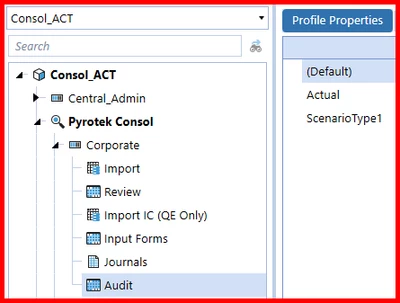
I created a new Scenario and assigned it as ScenarioType 3. I went into Application Properties and made sure ScenarioType2 general and dimensions were set up for it. I then went into the Workflow Profile and created a new Form under one of the workflow and it is not showing up. Did I miss something when I setup the new scenario?

WillVitale_0-1711575931634.png

Thanks,

Will

Best answer by Noemi

Hey Will, I can see that on your first screenshot you are looking at a workflow profile under the Consol_ACT Cube Root WF profile but on your cube setting the suffix assigned to Scenario Type3 is AUD. If you want to see ScenarioType3 on a WF profile under the _ACT you need to assign the same suffix. Otherwise you can create a new cube root WF profile (Consol_AUD) and create a new WF profile under that and your ScenarioType3 will be there.

2 replies

March 28, 2024

Make sure you refresh the application (the big white/green refresh icon on the top bar) and then refresh the Workflow Profiles page (close and reopen, or the small refresh icons on the middle bar).

Also, you're looking at a Cube Root Profile with a suffix (_ACT), so make sure you've added that suffix to your ScenarioType3 in Cube Properties.

March 28, 2024

Hey Jack,

I tried that before and still got nothing, so maybe I'm missing something else?

I went in the Cubes and went into Cube Properties and Cube Dimensions to make sure everything was set up for ScenarioType3 and still nothing is showing up. Any other thoughts?


WillVitale_0-1711638484841.png


WillVitale_1-1711638506954.png

Will

NoemiAnswer
March 28, 2024

Hey Will, I can see that on your first screenshot you are looking at a workflow profile under the Consol_ACT Cube Root WF profile but on your cube setting the suffix assigned to Scenario Type3 is AUD. If you want to see ScenarioType3 on a WF profile under the _ACT you need to assign the same suffix. Otherwise you can create a new cube root WF profile (Consol_AUD) and create a new WF profile under that and your ScenarioType3 will be there.

March 28, 2024

Oh I didn't know that! Thank you so much. That worked 🙂

Will